
Compress video for YouTube online
Sorry to admit, sometimes size DOES matter. All the social media have their file “weight” limit, for YouTube it is 128GB. Looks quite sufficient, right?
But imagine how long it will take to upload such a bulk - and then download it. Sure, if you have time and/or some licensed software to edit, alter, and compress YouTube video, that’s not a problem. But what if you don’t?
There may be various scenarios when you just need to act promptly. You may witness a road accident (hopefully that will not be the case!), abusive practices or other occurrences that should be made public as soon as possible.
Then you need an online and free tool for compressing any video file in several secs without losing quality.
Like the Video Compressor by Clideo.
We’d get tired to recite all the advantages of the tool. Let us just mention that it is:
- user-friendly, you’ll sort all the specs out in no time;
- compatible with all the types of OS, including Mac;
- available for all the main video formats, including MP4, MOV and others;
- last but not least – safe, as it doesn’t store and share any personal information and uploaded data with third parties.
Follow three simple steps:
Add a video
To upload your own records click the "Choose file" button. Your file may be stored at your device (PC, Mac or a smartphone) or in Google Drive, Dropbox cloud storage. Click a drop-down menu on the right of the blue pane to upload from the latter options.
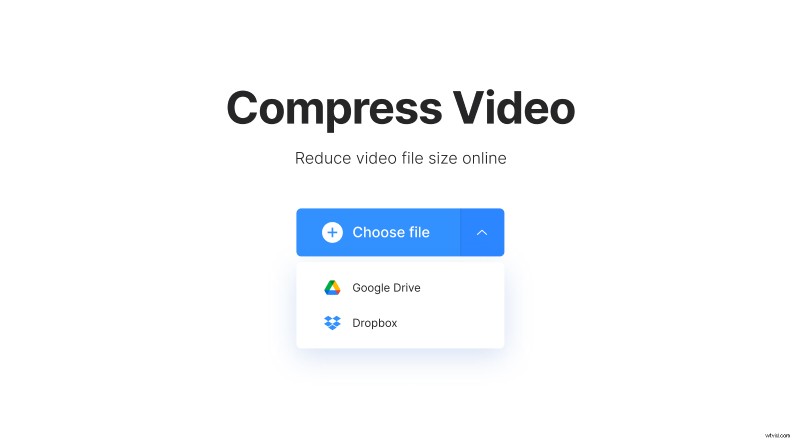
Mind the limit of 500 MB for free uploading. Good news - there are no quantity limits! You may compress as many files as you need.
Wait and relax
Have a nice cup of tea or take a short nap (just kidding! About sleeping, not about tea). While we are processing your file you’ll have some time for yourself - you could use it for choosing the next video to compress.
Save the video
Watch a preview of the ready video and download it or start over if you are not happy with the result. The system will show you the parameters “before” and “after, like in diet pills commercials, and count up the saved space (in our case it was impressive 47%!).

Save your compressed video on your device or in the cloud: Google Drive or Dropbox.