

Apple has released iOS 11.1 to the general public. The new version of iOS includes a variety of bug fixes, feature enhancements, security improvements, and other additions to the mobile operating system, making iOS 11.1 a recommended update for iPhone and iPad users running a prior version of iOS 11.
Separately, Apple also released the final version of macOS High Sierra 10.13.1 for Macs, security updates to prior Mac OS releases, watchOS 4.1 for Apple Watch, and tvOS 11.1 for Apple TV.
iOS 11.1 includes over 70 new emoji icons, including dinosaurs, pie, broccoli, bearded people, breastfeeding person, gender neutral characters, wizard, pixies, zebra, scarf, brain, vampires, and a variety of other characters.
Additionally, iOS 11.1 restores the popular 3D Touch multitasking gesture on iPhone devices equipped with 3D Touch.
Users who have been experiencing any problems with iOS 11, along with perceived battery drain or slow performance, should also install iOS 11.1, as the update may relieve some of those issues.
How to Download and Install iOS 11.1 Update
Users can download iOS 11.1 now through the Software Update mechanism on their devices, or through iTunes. The easiest way is through the OTA update available on the device in the Settings app.
Back up your iPhone or iPad before installing iOS 11.1 update.
- Open the “Settings” app on the iPhone or iPad
- Go to “General” and then to “Software Update”
- Choose “Download and Install” when iOS 11.1 becomes available
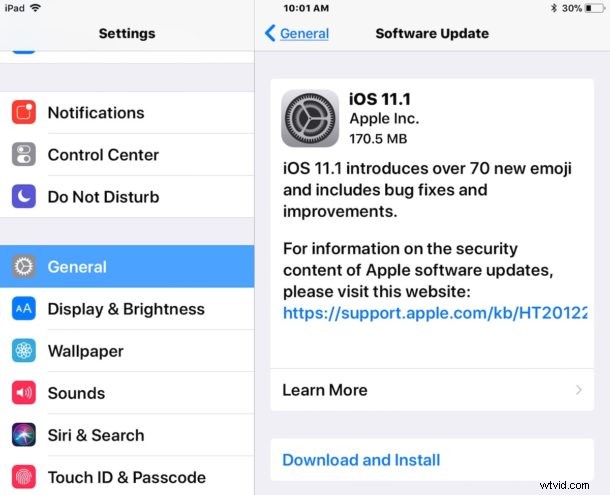
The delta update is around 180mb if you’re coming from a prior iOS 11 build.
Users can also choose to download and update to iOS 11.1 via iTunes by connecting an iPhone, iPad, or iPod touch to their computer, launching iTunes, and installing the update when requested.
iOS 11.1 IPSW Firmware Download Links
Another option is to download iOS 11.1 as firmware in the form of IPSW files. The IPSW firmware is then used with iTunes to update the system software of a compatible iPhone or iPad manually. This is generally more advanced and not recommended for most users:
- iPhone X
- iPhone 8
- iPhone 8 Plus
- iPhone 7
- iPhone 7 Plus
- iPhone 6s
- iPhone 6s Plus
- iPhone 6
- iPhone 6 Plus
- iPhone SE
- iPhone 5s
- iPad Pro 10.5 inch
- iPad Pro 12.9 inch 2nd generation
- iPad Pro 9.7 inch
- iPad Pro 12.9 inch 1st generation
- iPad 9.7 inch 2017 model
- iPad Air 2
- iPad Air 1
- iPad mini 4
- iPad mini 3
- iPad Mini 2
- iPod Touch 6th generation
Be sure to save the IPSW file with a .ipsw file extension, otherwise iTunes may not recognize it.
iOS 11.1 Release Notes
Separately, Mac users will find macOS High Sierra 10.13.1 along with security updates to El Capitan and Sierra. Apple Watch users will find watchOS 4.1 available, and tvOS 11.1 is available to download for Apple TV as well. A minor update to iTunes, versioned as 12.7.1, is also available for Mac and Windows PC.