
Apple has released iOS 11.0.2 for iPhone, iPad, and iPod touch devices running iOS 11. This is the second small bug fix update for iOS 11 that aims to patch various bugs and offer improvements to the operating system, making it recommended for users who are running a prior version of the iOS 11 release.
Users can download iOS 11.0.2 for compatible iPhone and iPad hardware through either the Settings app on their devices, via iTunes on a computer, or they can install the update manually by downloading and using IPSW firmware files for iOS 11.0.2 linked below.
Release notes accompanying the iOS 11.0.2 download say the update will fix an issue where crackling sounds occur during some phone calls on iPhone 8 and iPhone 8 Plus devices. Additionally, a bug where some photos appeared hidden is addressed. Finally, the update fixes and issue where attachments on certain encrypted emails could not be opened.
How to Download & Update to iOS 11.0.2
Always back up your device before installing any software update, even small point releases like this. The simplest way to update to iOS 11.0.2 is through the Settings app OTA mechanism:
- Back up the iPhone or iPad if you have not yet done so recently
- Open the “Settings” app in iOS and go to “General” and choose “Software Update”
- Select “iOS 11.0.2” and choose “Download & Install” when it is available

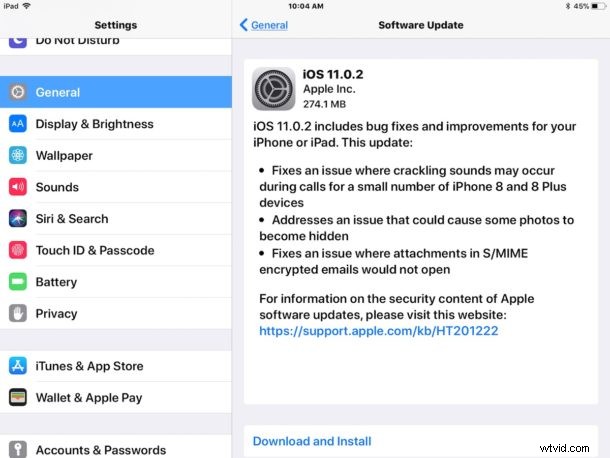
The OTA update is about 275 MB in size.
If you do not find iOS 11.0.2 available on your iPhone or iPad, be sure you have unenrolled from the beta program by removing the beta profile from the iOS device, and then try quitting and relaunching the Settings app. You may need to restart the iOS device to make the non-beta versions appear after removing the iOS beta profile.
Users can also connect their device to a computer with iTunes and install the update when it becomes visible within the iTunes Summary tab.
iOS 11.0.2 IPSW Direct Download Links
Advanced users who prefer to update iOS 11.0.2 via IPSW firmware can do so with the links below. Choose the IPSW that is compatible with your particular device, then you can use the standard directions to use the IPSW to update iOS on the iPhone or iPad with the firmware file and iTunes.
- iPhone 8 (10,4)
- iPhone 8 Plus (10,5)
- iPhone 7
- iPhone 7 Plus
- iPhone 6s
- iPhone 6
- iPhone 6s Plus
- iPhone 6 Plus
- iPhone SE
- iPhone 5s
- iPad Pro 10.5 inch
- iPad Pro 12.9 inch 2nd generation
- iPad Pro 12.9 inch 1st generation
- iPad Pro 9.7 inch
- iPad 9.7 inch 2017 model (Air 3?)
- iPad Air 2
- iPad Air 1
- iPad mini 4
- iPad mini 3
- iPad mini 2
- iPod touch 6th generation
For most users there is little reason to bother with manual firmware updates, and using the Settings app or standard iTunes method is perfectly acceptable.