
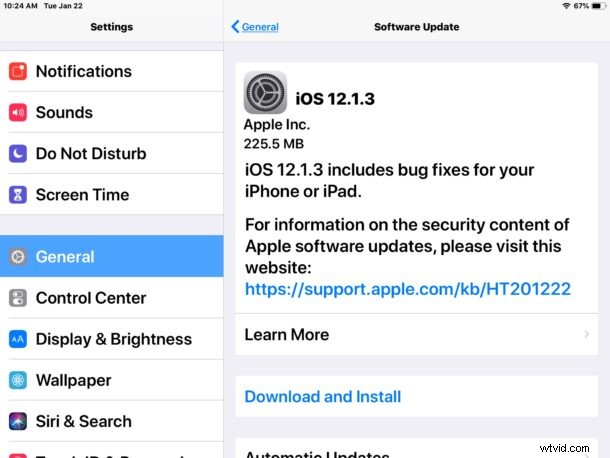
Apple has released iOS 12.1.3 for iPhone and iPad users. The software update is a fairly minor release, including a handful of bug fixes and security enhancements to the mobile operating system.
Additionally, Apple has released MacOS Mojave 10.14.3 and Security Update 2019-001 for High Sierra and Sierra, watchOS 5.1.3 for Apple Watch, tvOS 12.1.2 for Apple TV, and an update to HomePod. Those devices can update to the latest versions of system software through their respective Settings apps.
How to Download & Install iOS 12.1.3
The simplest method of installing iOS 12.1.3 to iPhone or iPad is from the Software Update section of iOS Settings app.
Always backup iPhone or iPad to iCloud, iTunes, or both, before beginning any iOS update. This allows for restoring should something go wrong.
- Open “Settings” app in iOS then choose “General” and “Software Update”
- When iOS 12.1.3 is shown, tap on “Download & Install”
The iPhone or iPad will reboot to complete the installation to iOS 12.1.3. You will need adequate available storage available to install the software update.
Another option is to download and install iOS 12.1.3 through iTunes on a Mac or Windows PC by connecting the iOS device to a computer running the latest version of iTunes and selecting the ‘Update’ option within iTunes.
iOS 12.1.3 IPSW Download Links
The below links to IPSW firmware files are pointing to hosted files on Apple servers:
- iPhone XS Max
- iPhone XS
- iPhone XR
- iPhone X
- iPhone 8
- iPhone 8 Plus
- iPhone 7
- iPhone 7 Plus
- iPhone 6s
- iPhone 6s Plus
- iPhone 6
- iPhone 6 Plus
- iPhone SE
- iPhone 5s
- iPad Pro 12.9 inch 1st generation
- iPad Pro 12.9 inch 2nd generation
- iPad Pro 12.9 inch 3rd generation
- iPad Pro 11-inch first generation
- iPad Pro 10.5-inch
- iPad Pro 9.7‑inch
- iPad 9.7-inch 2017 model not the Pro
- iPad 9.7-inch 2018 model not the Pro
- iPad Air 2
- iPad Air 1
- iPad mini 4
- iPad mini 3
- iPad mini 2
- iPod touch 6th generation
Installing iOS with IPSW files is somewhat advanced but it’s not particularly difficult. The majority of iPhone and iPad users should use the simpler update methods via Settings or iTunes however.
iOS 12.1.3 Release Notes
The release notes accompanying iOS 12.1.3 are as follows:
Separately, Apple has released MacOS Mojave 10.14.3 update and security updates for Mac computers, watchOS 5.1.3 for Apple Watch and tvOS 12.1.2 for Apple TV.