
Apple has released iOS 11.3.1 for iPhone and iPad users. The update is said to include some security updates, and also resolves a problem that caused some iPhone devices with repaired screens to not work as intended.
The security updates make the iOS 11.3.1 update relevant to all iPhone and iPad users with devices running a prior iOS build. The unresponsive screen issue is apparently limited to select iPhone 8 models that were repaired using third-party components, emphasizing why it’s important to repair a broken iPhone screen through Apple or an Apple authorized repair center.
Separately, Apple has released Security Update 2018-001 for MacOS High Sierra, and Safari 11.1 for Mac OS El Capitan, Sierra, and High Sierra.
Download iOS 11.3.1 for iPhone or iPad
Always back up an iPhone or iPad to iCloud or iTunes, or both, before installing any system software update:
- Open the “Settings” app on the iPhone or iPad
- Go to “General” and then to “Software Update”
- When iOS 11.3.1 appears, choose to “Download and Install”
iOS users can also install iOS 11.3.1 through iTunes by connecting the iPhone or iPad to a computer and launching iTunes.
Another more advanced option is to download and install the iOS 11.3.1 software update as an IPSW file and manually install it, the links to IPSW firmware files are below.
iOS 11.3.1 IPSW Download Links
Users can also choose to install IPSW files through iTunes, using IPSW files is considered advanced but is not particularly complex, though the process is unnecessary for most iPhone and iPad users.
- iPhone X
- iPhone 8
- iPhone 8 Plus
- iPhone 7
- iPhone 7 Plus
- iPhone 6s
- iPhone 6
- iPhone 6s Plus
- iPhone 6 Plus
- iPhone SE
- iPhone 5s
- iPad Pro 9.7‑inch
- iPad Pro 10.5-inch
- iPad Pro 12.9-inch 1st generation
- iPad Pro 12.9-inch 2nd generation
- iPad 5 9.7-inch not-pro 2017 model
- iPad 6 9.7-inch not-pro 2018 model
- iPad Air 2
- iPad Air 1
- iPad mini 4
- iPad mini 3
- iPad mini 2
- iPod touch 6th generation
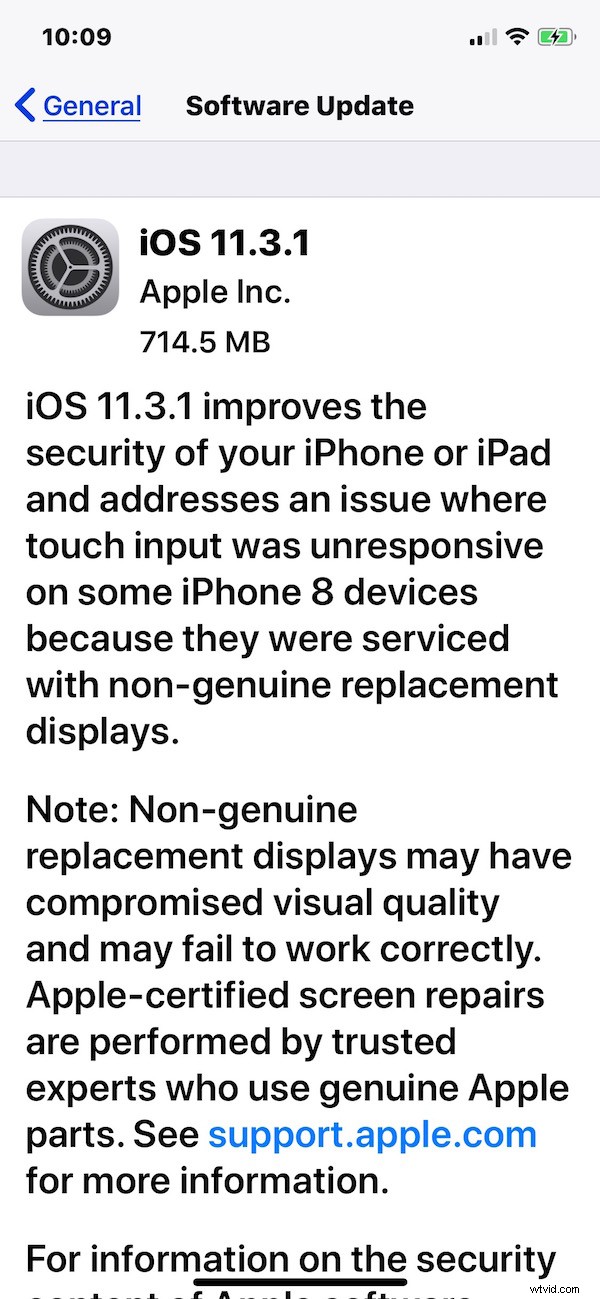
iOS 11.3.1 Release Notes
Release notes accompanying the iOS 11.3.1 download are as follows:
Separately, Mac users can find Safari 11.1 along with Security Update 2018-001 for High Sierra.