

Apple has released iOS 11.2.5 for iPhone and iPad. The final version of iOS 11.2.5 includes bug fixes, security enhancements, along with support for the HomePod speaker system from Apple, and a new capability for Siri to read short news digests to you.
Additionally, Apple has released software updates for Mac as macOS 10.13.3 and security updates 2018-001 for El Capitan and Sierra, along with updates to Apple TV, and watchOS.
The easiest way to download and install iOS 11.2.5 is from the Software Update mechanism within the Settings app of the iPhone or iPad, though users can also choose to install the software update from iTunes, or via IPSW firmware files linked below.
How to Install iOS 11.2.5 Update
Be sure to backup to iCloud, iTunes, or both, before proceeding to install any iOS software update.
- Open the “Settings” app and go to “General”, and then choose “Software Update”
- When iOS 11.2.5 appears, choose to “Download and Install”
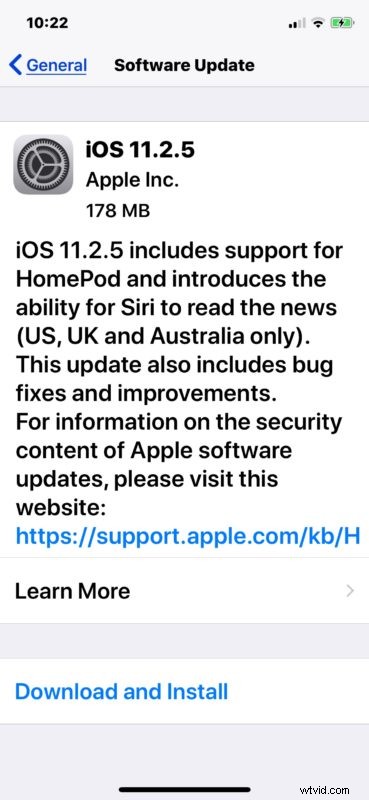
The iPhone or iPad will download and install the iOS software update, and reboot a few times in the process. Be sure the device is sufficiently powered up or plugged into an outlet to install.
If iOS 11.2.5 is not yet showing up for you, wait a few minutes and try looking for it again in the Software Update section of iOS Settings.
Another option is to connect the iPhone or iPad to a computer with iTunes and install the software update that way, or by using the IPSW firmware files available to download at the links below.
iOS 11.2.5 IPSW Firmware Download Links
Anyone can use IPSW to install iOS software updates, but it is generally considered more advanced and requires iTunes and a USB cable. The links below point to Apple servers, right-click and choose Save As and be sure it saves with a .ipsw file extension so that iTunes can recognize the file.
- iPhone X
- iPhone 8
- iPhone 8 Plus
- iPhone 7
- iPhone 7 Plus
- iPhone 6s
- iPhone 6s Plus
- iPhone 6 Plus
- iPhone 6
- iPhone SE
- iPhone 5s
- iPad Pro 10.5-inch
- iPad Pro 12.9″ 2nd generation
- iPad Pro 12.9″ 1st generation
- iPad Pro 9.7‑inch
- iPad 9.7-inch 2017 model, not pro
- iPad Air 2
- iPad Air 1
- iPad mini 4
- iPad Mini 3
- iPad Mini 2
- iPod Touch 6th generation
iOS 11.2.5 Release Notes
The brief release notes accompanying the iOS 11.2.5 download are as follows:
Separately, Apple has also released macOS 10.13.3 High Sierra for Mac users, security updates for Mac OS X El Capitan and macOS Sierra, watchOS 4.2.2 for Apple Watch, and tvOS 11.2.5 for Apple TV.
WatchOS and tvOS updates can be installed through their respective software update mechanisms, while the macOS High Sierra update and security updates for Sierra and El Capitan are available through the Mac App Store.