
Apple has released iOS 12.3 for iPhone and iPad. The final stable version of iOS 12.3 includes a handful of bug fixes, along with AirPlay 2 support and a redesigned TV app.
Separately, Apple has released macOS Mojave 10.14.5 for Mac, along with watchOS 5.2.1 for Apple Watch, tvOS 12.3 for Apple TV.
How to Download & Install iOS 12.3 on iPhone or iPad
Updating to iOS 12.3 on iPhone or iPad is easiest from the Software Update section within the Settings app. Before beginning any software update, always backup the iPhone or iPad to iCloud or iTunes before starting the update process. Backups allow you to restore your data just in case something goes wrong. Don’t skip making a backup.
- Open the “Settings” app in iOS
- Go to “General” and then go to “Software Update”
- Choose “Download & Install” when iOS 12.3 update is available
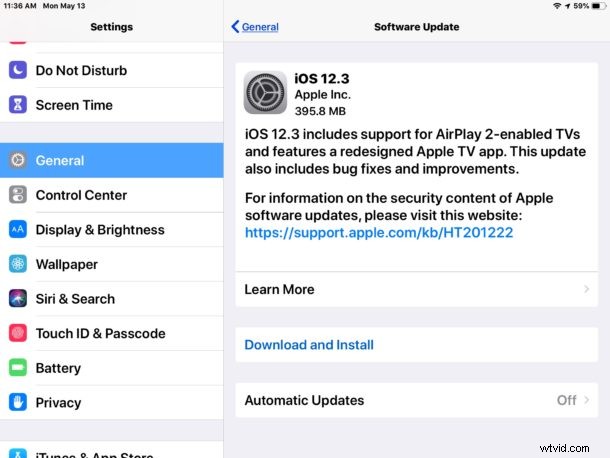
The iPhone or iPad will automatically reboot to complete the update process. How long it takes to complete updating to iOS 12.3 depends on a variety of factors, including the current iOS version, the device itself, and the speed of internet service.
You can also choose to update to iOS 12.3 with iTunes on a computer.
Downloading & Installing iOS 12.3 with iTunes
Another option is to connect an iPhone or iPad to a Mac or Windows PC with the latest version of iTunes and to update to iOS 12.3 from iTunes. Once again, be sure to backup your device before beginning.
- Connect the iPhone or iPad to a computer with iTunes
- Backup the iOS device, then choose to Update system software when the iOS 12.3 update is shown as available
Whether you update to iOS 12.3 from iTunes or iOS Software Update is mostly a matter of preference and convenience.
iOS 12.3 IPSW Download Links
Advanced users can choose to download and use IPSW firmware files for installing iOS updates, though this will require a computer with iTunes and a USB cable.
- iPhone XS Max
- iPhone XS
- iPhone XR
- iPhone X
- iPhone 8
- iPhone 8 Plus
- iPhone 7
- iPhone 7 Plus
- iPhone 6s
- iPhone 6s Plus
- iPhone 6
- iPhone 6 Plus
- iPhone SE
- iPhone 5s
- iPad Pro 12.9-inch model 1st generation
- iPad Pro 12.9-inch model 2nd generation
- iPad Pro 12.9-inch model 3rd generation 2018 model
- iPad Pro 11-inch 2018 model
- iPad Pro 10.5-inch
- iPad Pro 9.7‑inch model
- iPad 9.7-inch 2017 model 5th generation
- iPad 9.7-inch 2018 model 6th generation
- iPad Air 3 2019 model
- iPad Air 2
- iPad Air 1
- iPad mini 5 2019 model
- iPad mini 4
- iPad mini 3
- iPad mini 2
- iPod touch 6th generation
iOS 12.3 Release Notes
Release notes accompanying iOS 12.3 are as follows:
Aside from iOS 12.3, Apple also released updates for other Apple system software, including macOS Mojave 10.14.5 for Mac, watchOS 5.2.1 for Apple Watch, tvOS 12.3 for Apple TV, and other small updates to HomePod, Safari