
Apple has released iOS 14.5 and iPadOS 14.5 for iPhone and iPad. The updates include a handful of new features, new emoji icons, and other improvements, and are therefor recommended to install for all iPhone and iPad users running prior versions of 14.x.
Separately, Apple has also released updates for macOS Big Sur 11.3, small updates for macOS Catalina and Mojave, and updates for watchOS 7.4 and tvOS 14.5.
iOS 14.5 and iPadOS 14.5 includes two new Siri voice options, removes gender and accent specifications for Siri voices, and no longer defaults to being a female voice in the USA. Additionally, iOS 14.5 and iPadOS 14.5 includes support for Playstation 5 and Xbox X game controllers, a new feature allowing users to unlock an iPhone using Apple Watch, dual SIM card support for 5G cellular networks, some additional privacy features, and a handful of other smaller features and changes. You’ll also find new Emoji available, including a woman with a beard, numerous skin color choices for couple emojis, syringe, a sick coughing face, dazed face, heart on fire, and a bandaged heart.
How to Download & Update iOS 14.5 / iPadOS 14.5
Be sure to backup iPhone or iPad to iCloud, iTunes, or Finder before installing system software updates on your devices. Failure to backup can lead to data loss.
The easiest way to download the latest iOS / iPadOS update is via the Settings app.
- Open the “Settings” app on iPhone or iPad
- Go to “General”
- Go to “Software Update”
- Select “Download and Install” for iOS 14.5 / iPadOS 14.5
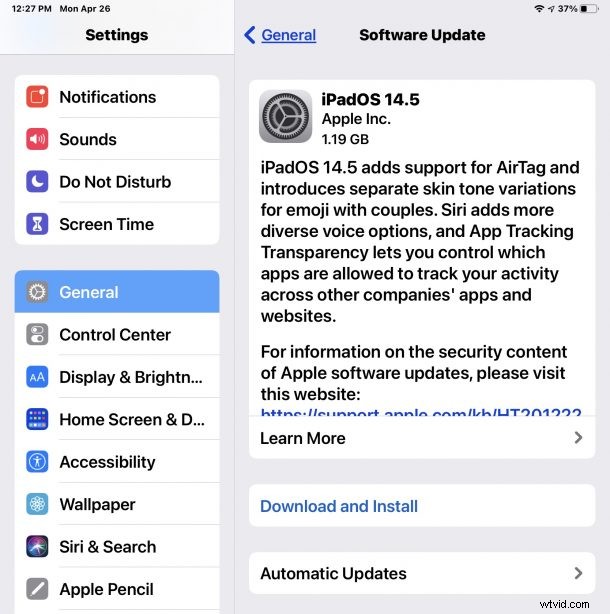
Installing the update will require the device to reboot. You’ll also need to be sure the device is either plugged in, or over 55% battery capacity charge available.
Users can also update to the latest iOS / iPadOS versions through a computer, by connecting their iPhone or iPad to a Mac or Windows PC and updating through Finder or iTunes, respectively.
Advanced users can also decide to update system software manually by using IPSW firmware files for their specific devices.
iOS 14.5 & iPadOS 14.5 ISPW Direct Download Links
iOS 14.5 IPSW
- iPhone 12
- iPhone 12 Pro
- iPhone 12 Pro Max
- iPhone 12 mini
- iPhone 11
- iPhone 11 Pro
- iPhone 11 Pro Max
- iPhone XS Max
- iPhone XS
- iPhone XR
- iPhone X
- iPhone 8
- iPhone 8 Plus
- iPhone 7
- iPhone 7 Plus
- iPhone 6s
- iPhone 6s Plus
- iPhone SE – 2nd generation 2020 model
- iPhone SE – 1st generation
- iPod touch – 7th generation
iPadOS 14.5 IPSW
- 12.9″ iPad Pro – 5th gen M1 (2021)
- 12.9″ iPad Pro – 4th generation (2020)
- 12.9″ iPad Pro – 3rd generation (2018)
- 12.9″ iPad Pro – 2nd generation
- 12.9″ iPad Pro – 1st generation
- 11″ iPad Pro – 3rd generation M1 (2021)
- 11″ iPad Pro – 2nd generation (2020)
- 11″ iPad Pro – 1st generation (2018)
- 10.5″ iPad Pro
- 9.7″ iPad Pro
- iPad Air – 4th generation
- iPad Air – 3rd generation
- iPad Air – 2nd generation
- iPad – 5th generation
- iPad – 6th generation
- 10.2″ iPad – 7th generation
- 10.2″ iPad – 8th generation
- iPad mini – 5th generation
- iPad mini 4
iOS 14.5 / iPadOS 14.5 Release Notes
Release notes accompanying iOS 14.5 and iPadOS 14.5 are as follows:
watchOS 7.4 Release Notes
watchOS 7.4 was also released today and is available to download for compatible Apple Watch devices. Release notes for watchOS 7.4 are as follows:
Aside from iOS and iPadOS, Apple has also released the MacOS Big Sur 11.3 update for Mac users running Big Sur, alongside Safari updates to macOS Catalina and macOS Mojave, updates to watchOS for Apple Watch, and an update for Apple TV’s tvOS 14.5.