
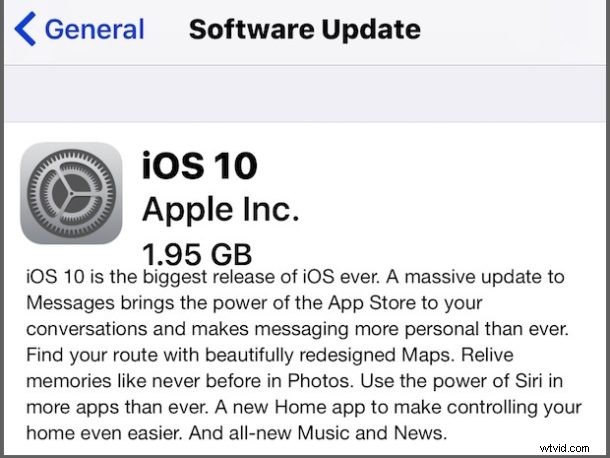
Apple has released iOS 10, the latest software update for compatible iPhone, iPad, and iPod touch devices. The new system software release includes many new features and enhancements to the iOS experience, including a dramatically overhauled Messages app complete with animations, stickers, and sketching, improvements to Maps, redesigned Notifications, a new lock screen experience, a redesigned Music app, new Photos app features, and much more.
You can prepare for iOS 10 or if you’re impatient you can always dive right into the update too, but do be sure to at least backup beforehand. All modern iPhone and iPad hardware supports the release, you can check the full iOS 10 compatibility list here if you are uncertain if your specific device is supported.
Download & Install iOS 10 with Over-the-Air
Users can download and install the iOS 10 update through the Over The Air update mechanism on the iPhone or iPad itself.
- Back up your iPhone, iPad, or iPod touch before starting the software update
- Open the “Settings” app in iOS and go to “General” and to “Software Update”
- When iOS 10 appears, choose to Download and Install
The update is somewhat large and requires about 2.5 GB to 3 GB of free space to install, though most of that storage space should become available again after the update has completed.
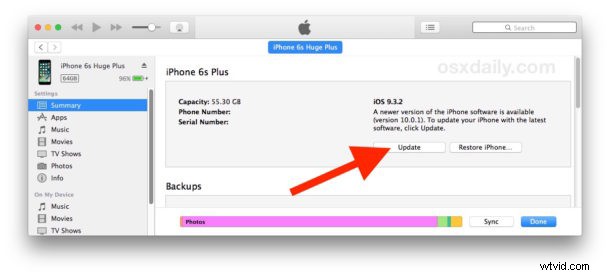
Another option is for users to update to iOS 10 through iTunes. Be sure to get the latest version of iTunes if you’re going that route, a new version was released today. Updating iOS through iTunes is simply a matter of connecting the iPhone or iPad to the computer, launching iTunes, and choosing the update button.
How to Update to iOS 10 with iTunes
Be sure to install the latest version of iTunes (12.5.1) before attempting to update iOS 10 through the app, the rest is easy:
- Connect the iPhone, iPad, or iPod touch to a computer with iTunes with a USB cable
- Choose “Backup” to backup data on the device, do not skip the backup process to iCloud or iTunes (or both)
- Launch iTunes and choose “Update” when the iOS 10.0.1 update is made available
Finally, more advanced users can choose to update to iOS 10 by using IPSW firmware files, which also requires iTunes. The direct download links for iOS 10 IPSW are available below.
iOS 10 IPSW Firmware Direct Download Links
The iOS 10 final build is 14A403 and is technically versioned as iOS 10.0.1, making it the same release as the iOS 10 GM.
- iPhone 7 Plus
- iPhone 7
- iPhone SE
- iPhone 6S Plus
- iPhone 6S
- iPhone 6 Plus
- iPhone 6
- iPhone 5S
- iPhone 5
- iPhone 5c
- iPod touch 6th gen
- 12.9 iPad Pro
- 9.7 iPad Pro
- iPad Air 2
- iPad Air
- iPad 4
- iPad Mini 3
- iPad Mini 2
- Updating…
Troubleshooting Problems with iOS 10 Update & Install
Some users are encountering various error messages when attempting to update iOS 10 system software. Two of the most common error messages are “Unable to Install Update” and getting stuck on “Verifying Update”, which are typically remedied by simply waiting a bit and retrying. The update servers at Apple are likely swamped with update requests, and often just waiting a short while will resolve any of the error messages.
Some users are discovering that iOS 10 update fails or iOS 10 update wants to connect to iTunes, with the connect to iTunes screen appearing on the display of the iPhone, iPad, or iPod touch. Why this happens is unclear, but unfortunately it means the device must be connected to iTunes on a computer using a USB cable to complete the update. You can read more about the iOS 10 update failure requiring iTunes here.
Separately, Apple has released watchOS 3 for Apple Watch, tvOS 10 for Apple TV, and iTunes 12.5.1 for Mac and Windows.
Did you install iOS 10 yet? What has been your experience? Let us know in the comments.