
Apple has officially released iOS 11 to all users with a compatible iPhone, iPad, or iPod touch. The new operating system includes a revised Siri voice, a new look for the App Store, a redesigned Control Center, the inclusion of significant new multitasking features for iPad, and various other changes to the iOS experience.
Read along to learn how to download and update to iOS 11, as well as to find iOS 11 IPSW download links from Apple.
Anyone can install iOS 11 now but users are advised to follow a few basic steps to prepare for iOS 11, including to insure device compatibility with the software release, backing up their iPhone or iPad, updating apps, and insuring there is enough available storage to install the software update. You can check a list of devices compatible with iOS 11 if you are not sure if your particular device is capable of running the new operating system.
Download and Update to iOS 11
The simplest way to download and update to iOS 11 is through the Software Update application on an iPhone or iPad. Be sure to back up your iPhone or iPad before beginning the software update process, you can backup through iCloud settings > Back Up > Back Up Now
- Open the “Settings” app in iOS and go to “General” and then to “Software Update”
- When iOS 11 becomes available, choose “Download and Install” to begin the software update
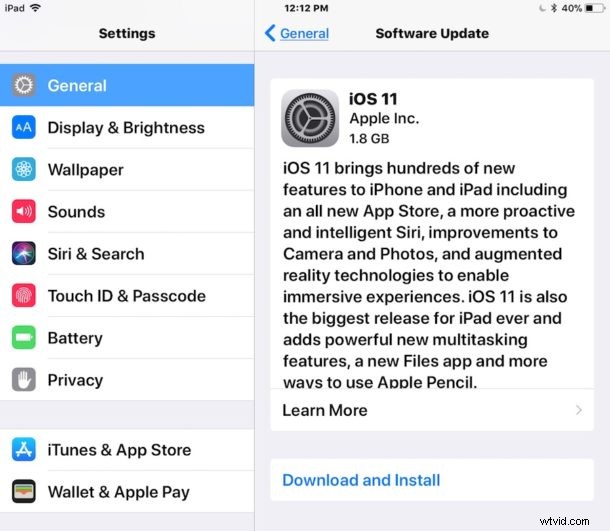
The iPhone, iPad, or iPod touch will restart itself automatically to complete installation. When the device boots back up, it will be running iOS 11.
Users can also install iOS 11 through iTunes on a computer by connecting their device to a Mac or Windows PC and choosing to update the system software when the new version is detected as available. Backup the iPhone or iPad to iCloud, or iTunes, or both, before beginning the software update to iOS 11.
iOS 11 IPSW Direct Download Links
Advanced users may prefer to install the iOS 11 software update via IPSW firmware files and iTunes. The final build of iOS 11 is 15A372. The links below point to IPSW firmware files on Apple servers, to download right-click and choose “save as” and place the firmware somewhere easily accessible.
iOS 11 IPSW for iPhone
- iPhone 7
- iPhone 7 Plus
- iPhone 6s
- iPhone 6s Plus
- iPhone 6
- iPhone 6 Plus
- iPhone SE
- iPhone 5s
- iPhone 8 (10.4))
- iPhone 8 Plus (10,5)
- iPhone X
iOS 11 IPSW for iPad
- iPad Pro 12.9 inch model, 2nd generation
- iPad Pro 12.9 inch, 1st generation
- iPad Pro 10.5 inch model
- iPad Pro 9.7 inch model
- iPad 9.7 inch (2017 model)
- iPad Air 2
- iPad mini 4
- iPad mini 3
- iPad Air 1
- iPad mini 2
iOS 11 IPSW for iPod Touch
- iPod touch 6th generation
IPSW firmware files must have the .ipsw file extension to be recognized by iTunes. If the file downloaded as a .zip you can convert it to .ipsw or just re-download and try again.
Separately, Apple has also released watchOS 4 and tvOS 11 updates to users with Apple Watch and Apple TV.