
Apple has released the final version of iOS 10.3 to users of iPhone, iPad, and iPod touch. Any device capable of running a prior iOS 10 release can install the iOS 10.3 update.
iOS 10.3 brings with it a variety of bug fixes, feature enhancements, and improvements, as well as the introduction of the new APFS new file system. Separately, tvOS 10.2 and watchOS 3.2 are also available as updates.
The most significant new feature addition to iOS 10.3 is probably the Find My AirPods feature, which offers users a way to help locate a missing wireless AirPod. The transition to the APFS file system is also fairly significant, and it adds a variety of benefits to app developers, aims to improve performance and file handling, expand file system capabilities, and also aims to improve encryption on iOS devices. Other minor adjustments are bug fixes to iOS are also included, the full release notes of iOS 10.3 are below for the curious.
How to Update and Install iOS 10.3 on iPhone, iPad
The simplest way to install iOS 10.3 update is to use the Software Update mechanism in iOS:
- Back up the iPhone or iPad before beginning, either to iTunes or iCloud, or both
- Open the “Settings” app in iOS and go to “General”
- Choose “Software Update”
- When iOS 10.3 appears, choose to “Download & Install”
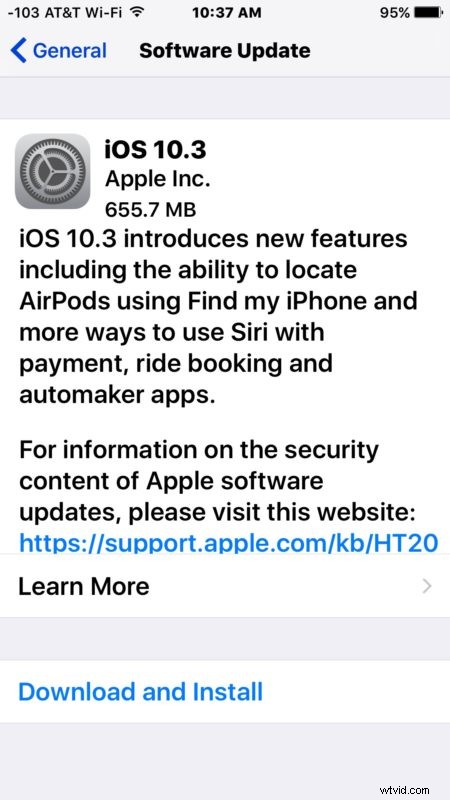
The device will download iOS 10.3 and then reboot to complete the update.
Always backup iOS devices before installing system software updates. Because iOS 10.3 changes the device file system to APFS, it is particularly important to backup your iPhone or iPad before installing this iOS update. Do not skip making a backup, avoiding a backup could lead to data loss.
iOS 10.3 IPSW Direct Download Links
Some users may wish to use IPSW files to update iOS to 10.3, those can be downloaded directly from Apple using the following links:
- iPhone 7
- iPhone 7 Plus
- iPhone 6s
- iPhone 6s Plus
- iPhone 6
- iPhone 6 Plus
- iPhone SE
- iPhone 5s
- iPhone 5
- iPhone 5c
- 12.9 inch iPad Pro
- 9.7 inch iPad Pro
- iPad (2017 model, iPad 5, iPad Air 3)
- iPad Air 2
- iPad Air
- iPad 4
- iPad Mini 4
- iPad Mini 3
- iPad Mini 2
- iPod touch 6th generation
Using IPSW requires iTunes and a computer, as well as a USB cable.
iOS 10.3 Release Notes
Release notes accompanying iOS 10.3 are as follows:
tvOS 10.2, watchOS 3.2, MacOS Sierra 10.12.4 Updates Available too
Apple has also issued minor updates to tvOS and watchOS, both available through the devices respective Software Update mechanism.
Additionally, Mac users will find macOS Sierra 10.12.4 available to download on their computers.