
Apple has released the final version of iOS 9.3 today for all compatible iPhone, iPad, and iPod touch devices.
iOS 9.3 includes several new features, including password protected Notes app, a night time color adjustment mode called Night Shift, multi-user support for iPad in education environments, and a variety of other minor changes.
Multiple bug fixes and security improvements are also included, making iOS 9.3 a recommended update to users running a prior version of iOS 9.
How to Update to iOS 9.3
The best way to update to iOS 9.3 on any iPhone, iPad, or iPod touch is through the over the air update mechanism on the device, as so:
- Back up the device to iTunes or iCloud and let the backup complete
- Open the Settings app and go to “General” followed by “Software Update”
- Choose “Download & Install” when IOS 9.3 becomes visible in the Software Update section
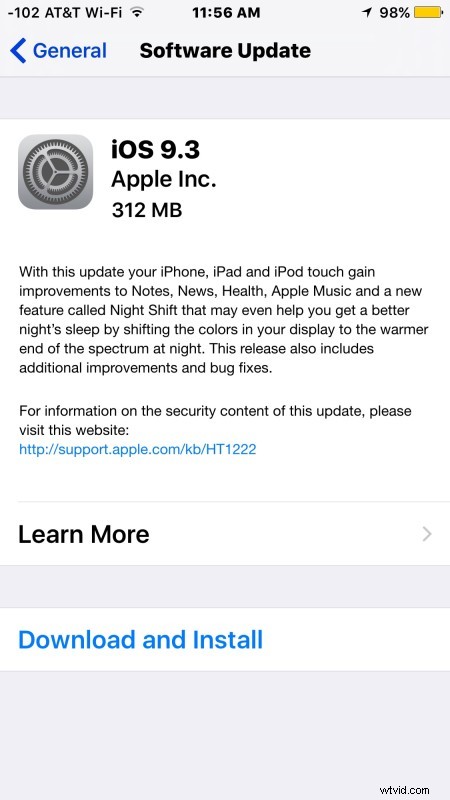
The iPhone, IPad, or iPod touch will automatically reboot and complete installation.
Users can also choose to update devices to iOS 9.3 by using iTunes on a computer, which requires a USB cable. In the summary section of iTunes, simply choosing the “Update” button will start the process.
iOS 9.3 IPSW Direct Download Links
An advanced option for updating iOS 9.3 is to use IPSW firmware files, which requires iTunes and a USB cable. The IPSW files are hosted by Apple on their servers, right-click and choose “Save As” for best results.
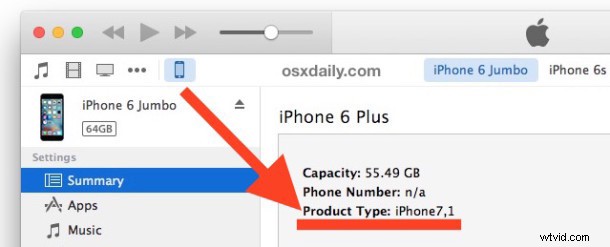
Be sure you download the proper IPSW file for the device in question, you can identify the iPhone product type information in iTunes in the summary section for the device:
- iPhone 6s
- iPhone 6s Plus
- iPhone SE
- iPhone 6
- iPhone 6 Plus
- iPhone 5s (CDMA)
- iPhone 5s (GSM)
- iPhone 5 (CDMA)
- iPhone 5 (GSM)
- iPhone 5c (CDMA)
- iPhone 5c (GSM)
- iPhone 4S
- iPad Pro 12″
- iPad Pro 12″(LTE Cellular)
- iPad Pro 9″ model
- iPad Pro 9″ model (LTE Cellular)
- iPad Air 2
- iPad Air 2 (LTE Cellular)
- iPad Air (5th generation Cellular)
- iPad Air (5th generation )
- iPad Air (5th generation China)
- iPad (4th generation CDMA)
- iPad (4th generation GSM)
- iPad (4th generation )
- iPad 3 Wi-Fi (3rd generation)
- iPad 3 Wi-Fi + Cellular (GSM)
- iPad 3 Wi-Fi + Cellular (CDMA)
- iPad 2 Wi-Fi (Rev A)
- iPad 2 Wi-Fi
- iPad 2 Wi-Fi + 3G (GSM)
- iPad 2 Wi-Fi + 3G (CDMA)
- iPad Mini (CDMA)
- iPad Mini (GSM)
- iPad Mini
- iPad Mini 2 (Cellular)
- iPad Mini 2
- iPad Mini 2 (China)
- iPad Mini 3 (China)
- iPad Mini 3
- iPad Mini 3 (Cellular)
- iPad Mini 4
- iPad Mini 4 (Cellular)
- iPod touch (5th-generation)
- iPod touch (6th-generation)
The saved IPSW file must have a .ipsw extension to work properly with iTunes for updating device firmware, it is not a zip file or any other file format.
iOS 9.3 Release Notes
Aside from the iOS world, Mac users will find OS X 10.11.4 available to update, and Apple Watch and Apple TV owners will find tvOS 9.2 and WatchOS 2.2 available for updating as well.