
Apple has released iOS 11.0.3 for iPhone, iPad, and iPod touch users running iOS 11. The latest small software update includes bug fixes to iOS and is therefore recommended to all users running iOS 11 on their devices.
Release notes accompanying the iOS 11.0.3 download mention the update fixes an issue here audio and haptic feedback were not working on some iPhone 7 Plus and iPhone 7 devices, and also fixes an issue where some displays were unresponsive to touch on certain iPhone 6s models screens that had been replaced from third party sourcing (perhaps related, we recommend using Apple to replace a broken iPhone screen for best results). It’s unclear if any other bugs or security fixes are included in the iOS 11.0.3 release.
Users can download and install iOS 11.0.3 using OTA with the Settings app, iTunes, or using IPSW firmware files for iOS 11.0.3 with the provided direct download links below.
Download & Install iOS 11.0.3 on iPhone and iPad
The simplest way to download and install the iOS 11.0.3 update is through the Software Update mechanism in iOS Settings. Be sure to backup your iPhone or iPad to iCloud or iTunes (or both) before beginning the software update.
- Open the “Settings” app, go to “General” and then to “Software Update”, then choose “Download and Install” on iOS 11.0.3
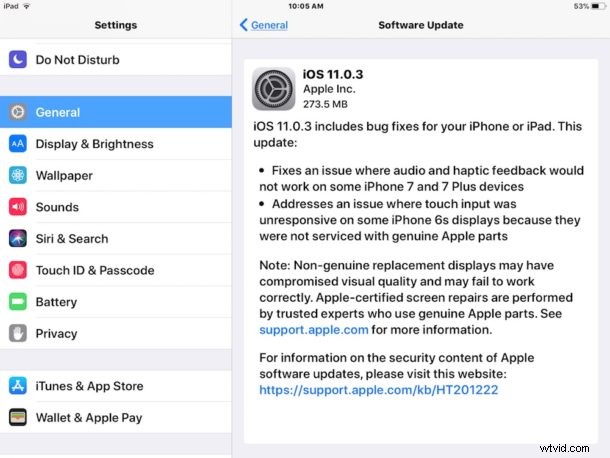
Users can also update to iOS 11.0.3 with iTunes on a computer with the generic update mechanism, or by using IPSW files.
iOS 11.0.3 IPSW Firmware Download Links
You can download iOS 11.0.3 as IPSW firmware files directly from Apple by using the links below, using IPSW to update iOS is considered advanced and is generally not necessary for most users:
- iPhone 8
- iPhone 8 Plus
- iPhone 7
- iPhone 7 Plus
- iPhone 6s
- iPhone 6s Plus
- iPhone 6
- iPhone 6 Plus
- iPhone SE
- iPhone 5s
- iPad Pro 9.7‑inch
- iPad Pro 10.5-inch
- iPad Pro 12.9-inch 2nd generation
- iPad Pro 12.9‑inch 1st generation
- iPad 9.7″ 2017 model (Air 3?)
- iPad Air 2
- iPad Air 1
- iPad Mini 4
- iPad mini 2
- iPod touch 6th generation
< li>iPad Mini 3
Apple is also working on a larger update for iOS 11 with iOS 11.1, which is currently in beta.