

Apple has released iOS 13.1.3 and iPadOS 13.1.3 with bug fixes for iPhone and iPad.
The new software updates for iPhone, iPad, and iPod touch aim to resolve a variety of issues on these devices, including fixing problems with Mail, iPhone not ringing or vibrating on incoming calls, Health app, resolves an issue where Voice Memos recordings weren’t downloaded properly, resolutions to issues with iCloud backup restores, a problem with Apple Watch not pairing, and more. The full release notes accompanying the downloads of iOS 13.1.3 and iPadOS 13.1.3 are included further below.
Separately, Apple released MacOS Catalina Supplemental Update 1 for Mac.
How to Download iOS 13.1.3 / iPadOS 13.1.3 Updates
Be sure to backup the iPhone / iPad to iCloud, iTunes, or a computer, before proceeding with any system software update.
- Open the “Settings” app on the iPhone or iPad
- Go to “General” and then to “Software Update”
- Choose “Download & Install” when the iOS 13.1.3 or iPadOS 13.1.3 update shows as available
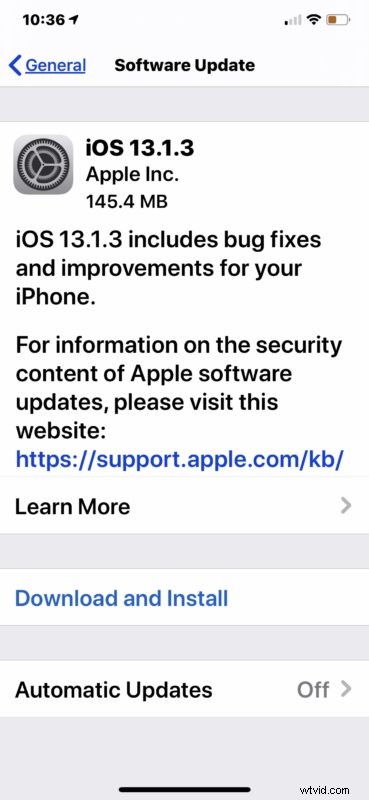
As always, the device will restart to complete installation of the software update.
Users can also choose to update to iOS 13.1.3 and iPadOS 13.1.3 through a computer by connecting their iPhone or iPad to a Windows PC with iTunes, a Mac with iTunes, or a Mac with MacOS Catalina.
Advanced users can also choose to use IPSW files to update system software.
iOS 13.1.3 IPSW Direct Download Links
- iPhone 11 Pro
- iPhone 11 Pro Max
- iPhone 11
- iPhone XS Max
- iPhone XS
- iPhone XR
- iPhone X
- iPhone 8 Plus
- iPhone 8
- iPhone 7
- iPhone 7 Plus
- iPhone 6s Plus
- iPhone 6s
- iPhone SE
- iPod touch 7th generation model
iPadOS 13.1.3 IPSW Direct Download Links
- iPad Pro 11-inch – 2018 model
- iPad Pro 12.9-inch 3rd generation – 2018 model
- iPad Pro 12.9-inch 2nd generation
- iPad Pro 12.9-inch 1st generation
- iPad Pro 10.5 inch
- iPad Pro 9.7‑inch
- iPad 7 10.2-inch – 2019 model
- iPad 6 9.7-inch – 2018
- iPad 5 9.7-inch – 2017
- iPad Air 3 2019 model
- iPad mini 5 2019 model
- iPad Air 2
- iPad mini 4
iOS 13.1.3 Release Notes
iPadOS 13.1.3 Release Notes
If you have been experiencing any issues with earlier releases of iOS 13 and iPadOS 13, it’s usually a good idea to install the latest software updates to obtain bug fixes. An earlier software update aimed to address fast battery drain in iOS 13 amongst other issues, while some users still experience the “No Sender” and “No Subject” Mail bug. Keep in mind that after installing a software update, iPadOS 13 and iOS 13 may feel slow for a brief while as the system software may rescan and reindex data on the device.