
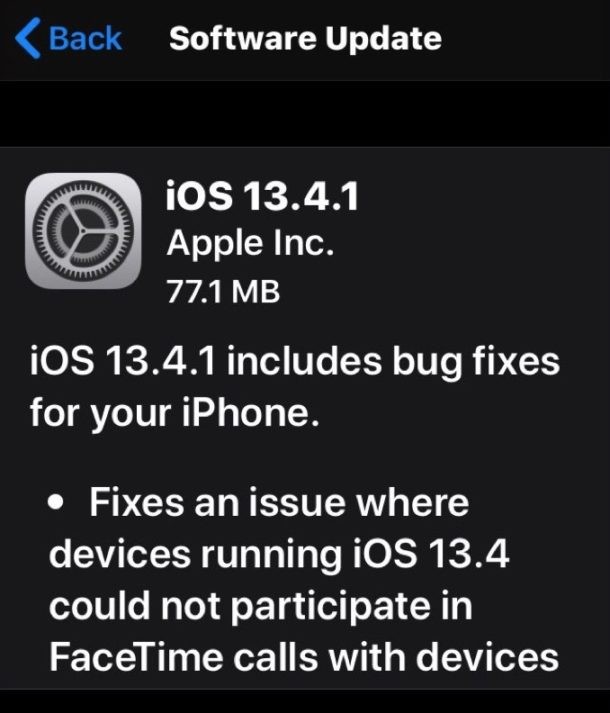
Apple has released iOS 13.4.1 and iPadOS 13.4.1 for iPhone, iPad, and iPod touch users.
The new version of iOS and iPadOS includes bug fixes, with the most notable being a resolution to a FaceTime issue where device running the newest iOS and iPadOS versions were unable to communicate with Apple devices running older system software. Thus if you have been experiencing issues with FaceTime calls lately, you may benefit from updating to the latest iOS 13.4.1 or ipadOS 13.4.1 release.
How to Update to iOS 13.4.1 or iPadOS 13.4.1
Be sure to backup iPhone or iPad to iCloud, iTunes, or MacOS Finder before beginning the software update.
The easiest way to update to iOS 13.4.1 and ipadOS 13.4.1 is with the Settings app Software Update function:
- Open the “Settings” app on the iPhone or iPad, then go to “General” and choose “Software Update”
- Choose “Download and Install” for iOS 13.4.1 or iPadOS 13.4.1
Either iOS 13.4.1 for iPhone or iPadOS 13.4.1 for iPad will then download and install automatically, requiring a reboot to complete installation.
The update itself is fairly small but nonetheless installing any software update requires a reasonable amount of storage be available on the iPhone, iPad, or iPod touch.
Alternatively, advanced users can choose to update their iOS and ipadOS devices manually by using IPSW firmware files.
For those interested in the firmware file approach, the links below point to .ipsw firmware files on Apple servers. Download the appropriate IPSW file for your device, making sure it has a .ipsw file extension when you save it.
iOS 13.4.1 IPSW Firmware Download Links
- iPhone 11 Pro
- iPhone 11 Pro Max
- iPhone 11
- iPhone XS Max
- iPhone XS
- iPhone XR
- iPhone X
- iPhone 8
- iPhone 8 Plus
- iPhone 7 Plus
- iPhone 7
- iPhone SE
- iPhone 6s
- iPhone 6s Plus
- iPod touch 7th-generation
iPadOS 13.4.1 IPSW Firmware Download Links
- iPad Pro 12.9″ 4th generation (2020)
- iPad Pro 12.9″ 3rd generation (2018)
- iPad Pro 12.9″ 2nd generation
- iPad Pro 12.9″ 1st generation
- iPad Pro 11″ (2018)
- iPad Pro 11″ (2020)
- iPad Pro 10.5-inch
- iPad Pro 9.7‑inch
- iPad 7 10.2-inch (2019)
- iPad 6 9.7-inch (2018)
- iPad 5 9.7-inch (2017)
- iPad Air 3 (2019)
- iPad mini 5 (2019)
- iPad Air 2
- iPad mini 4
iOS 13.4.1 Release Notes
Release notes included with the iOS 13.4.1 update are as follows:
iPadOS 13.4.1 Release Notes
The release notes for iPadOS 13.4.1 are largely the same, but also mention a fix for a flashlight bug specific to the latest iPad Pro models.
Mac users also have MacOS 10.15.4 Catalina Supplemental Update available to fix the same FaceTime bug, and Apple Watch users will find an update for the same purpose too.