
Apple has released iOS 15.3.1 and iPadOS 15.3.1 for iPhone and iPad users, respectively. The software update includes an important security fix, and also resolves an issue with Braille displays.
Separately, Apple released macOS Monterey 12.2.1 to fix a Bluetooth battery draining bug when a Mac is sleeping, and an update to watchOS for Apple Watch users.
How to Download & Update to iOS 15.3.1 or iPadOS 15.3.1 on iPhone & iPad
Before starting any software update, be sure to backup iPhone or iPad to iCloud, Finder, or iTunes.
- Open the “Settings” app on the iPhone or iPad
- Go to “General”
- Go to “Software Update”
- Choose to “Download and Install” for iOS 15.3.1 or iPadOS 15.3.1 when they show as available
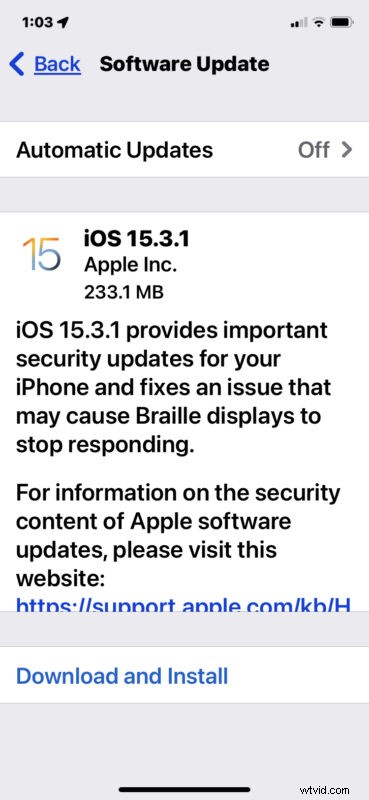
The update is around 200mb-300mb in size, depending on the device being installed onto, and requires the device to reboot to complete installation.
Users can also choose to update through Finder or iTunes, or by using IPSW using the links below.
iOS 15.3.1 IPSW Download Links
- Updating…
iPadOS 15.3.1 IPSW Download Links
- Updating…
iOS 15.3.1 Release Notes
Release notes accompanying the update download are as follows:
If you’re a Mac user running Monterey, don’t miss the separate macOS Monterey 12.2.1 update, which includes the same security fix, and also resolves an issue where Mac laptop batteries were draining when in sleep mode.
If you notice anything unique about iOS 15.3.1 or iPadOS 15.3.1, let us know in the comments.