
Apple has released iOS 15.6.1 for iPhone, and iPadOS 15.6.1 for iPad.
The small software updates include important security fixes and are therefore recommended for all iPhone and iPad users to install onto their devices. No new features or changes are expected in the update.
Separately, Mac users also will find macOS Monterey 12.5.1 update available with security patches as well.
How to Download & Update to iOS 15.6.1 & iPadOS 15.6.1
Backup the iPhone or iPad to iCloud, Finder, or iTunes before beginning a system software update.
- Open the “Settings” app on iPhone or iPad
- Go to “General”, and then to “Software Update”
- Choose to “Download and Install” for iOS 15.6.1 or iPadOS 15.6.1
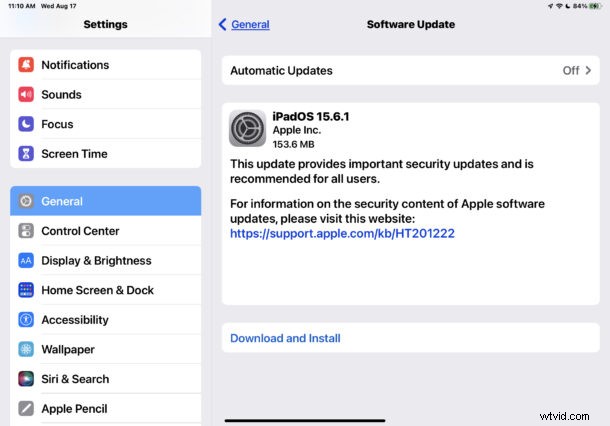
Installing the software updates will require the iPhone or iPad to restart.
Users can also opt to install the software update through a computer by using Finder on Mac, or iTunes on a Windows PC.
Advanced users can also update manually by using IPSW files, which also requires a computer and a USB connection.
iOS 15.6.1 IPSW Download Links
- Updating…
iPadOS 15.6.1 IPSW Download Links
- Updating…
iOS 15.6.1 Release Notes
Release notes included with the update are brief:
Did installing iOS 15.6.1 go smoothly for you? Let us know how if you encountered any issues or difficulties in the comments.