

Apple has released iOS 14.4.1 and iPadOS 14.4.1 with an important security fix for iPhone and iPad. The update is small, but due to the nature of the security flaw, all iPhone and iPad users are recommended to install the iOS 14.4.1 and iPadOS 14.4.1 update on their devices.
Separately, Apple also released the same security fix in watchOS 7.3.2 for Apple Watch, and macOS Big Sur 11.2.3 for Mac, along with Safari updates for macOS Catalina and Mojave.
Specifically the update fixes a security problem where “Processing maliciously crafted web content may lead to arbitrary code execution”.
How to Download & Update iOS 14.4.1 / iPadOS 14.4.1
Always backup iPhone or iPad to iCloud, iTunes, or Finder before installing system software updates.
The simplest way for most users to download software updates is through the Settings app.
- Open the “Settings” app on iPhone / iPad
- Go to “General”
- Go to “Software Update”
- Select “Download and Install” for iOS 14.4.1 / iPadOS 14.4.1
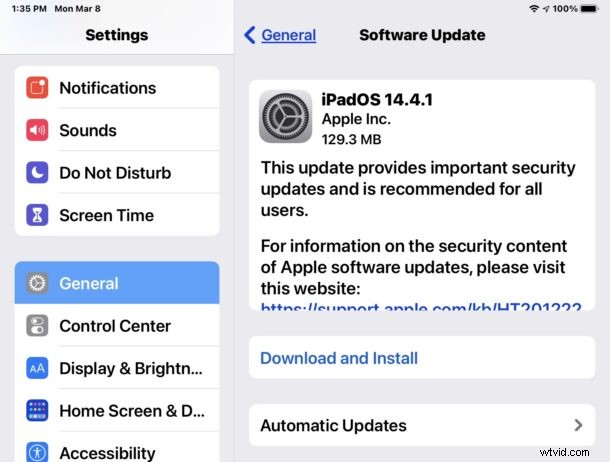
The device will need to reboot to complete installation.
Users can also choose to update iOS / iPadOS through a computer by connecting their eligible device to a Mac or Windows PC and updating through Finder or iTunes.
Additionally, advanced users can also choose to update system software using IPSW firmware files.
iOS 14.4.1 & iPadOS 14.4.1 ISPW Direct Download Links
- Updating…
iOS 14.4.1 / iPadOS 14.4.1 Release Notes
Release notes accompanying the download are brief:
Apple also issued MacOS Big Sur 11.2.3 update for Mac users running Big Sur, along with Safari updates to macOS Catalina and macOS Mojave, and an update to watchOS for Apple Watch.