

Apple has released iOS 13.2.2 and iPadOS 13.2.2 for iPhone and iPad users.
The latest software update release from Apple includes bug fixes and enhancements. A particularly noteworthy bug that is resolved with iOS 13.2.2 and iPadOS 13.2.2 is where background apps would spontaneously quit on their own, causing reduced performance for multitasking on iPhone and iPad. Additionally, bugs pertaining to cellular data and other issues have been resolved.
The full release notes for both iPadOS 13.2.2 and iOS 13.2.2 are further below for those interested.
How to Download & Install iOS 13.2.2 or iPadOS 13.2.2 Update
Be sure to backup iPhone or iPad to iCloud, iTunes, or a computer, before installing any system software update on any device.
- Open the “Settings” app on the device
- Go to “General” and then choose “Software Update”
- Select “Download & Install” for iOS 13.2.2 or iPadOS 13.2.2 update
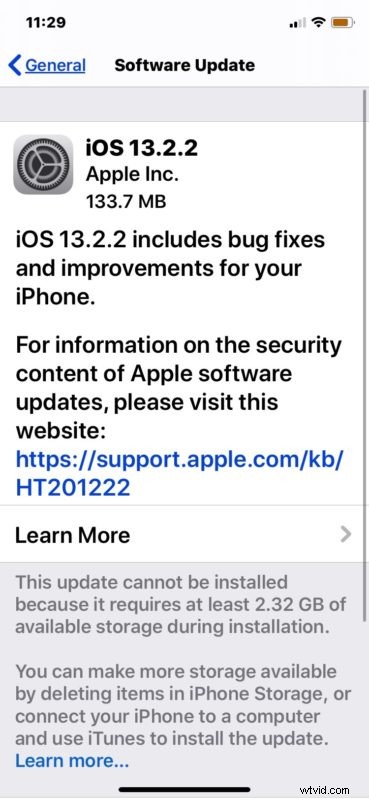
The iPhone or iPad will reboot itself as part of updating iOS and iPadOS. When finished, the device will boot back up with the latest system software release.
While the iOS 13.2.2 and iPadOS 13.2.2 updates are relatively small in size, weighing in around 135mb, installing the update requires around 2.5gb of free storage space to complete installation.
Aside from the Settings based update process, users can also install iOS 13.2.2 and iPadOS 13.2.2 update with a computer. This requires iTunes for Windows and on MacOS Mojave 10.14.6 or earlier, or the Finder in MacOS Catalina 10.15 or later.
Finally, more advanced users can use IPSW firmware files to update iOS and iPadOS system software manually.
iOS 13.2.2 IPSW Firmware Direct Download Links
- iPhone 11
- iPhone 11 Pro
- iPhone 11 Pro Max
- iPhone XS Max
- iPhone XS
- iPhone XR
- iPhone X
- iPhone 8 Plus
- iPhone 8
- iPhone 7
- iPhone 7 Plus
- iPhone 6s
- iPhone 6s Plus
- iPhone SE
- iPod touch 7th generation
iPadOS 13.2.2 IPSW Firmware Direct Download Links
- iPad Pro (11-inch) – 2018 model
- iPad Pro (12.9-inch) – 3rd generation 2018 model
- iPad Pro (12.9-inch) – 2nd generation
- iPad Pro (12.9-inch) – 1st generation
- iPad Pro (10.5-inch)
- iPad Pro (9.7‑inch)
- iPad 7 (10.2-inch) – 2019 model
- iPad 6 (9.7-inch) – 2018 model
- iPad 5 (9.7-inch) – 2017 model
- iPad Air 3 (10.5-inch) – 2019 model
- iPad Air 2
- iPad mini 5 – 2019 model
- iPad mini 4
The complete release notes accompanying downloads for iOS 13.2.2 and iPadOS 13.2.2 are repeated below.
iOS 13.2.2 Release Notes
iPadOS 13.2.2 Release Notes
If you’re currently running a prior version of iOS 13 or iPadOS 13, it’s likely a good idea to backup your device and to install iOS 13.2.2 or ipadOS 13.2.2 onto your iPhone, iPad, or iPod touch.
Let us know how the process of updating goes for you, and if you discover any problems, hiccups, issues, new features, or anything else noteworthy about the new iOS 13.2.2 and iPadOS 13.2.2 releases.