
Apple has released the iOS 9.0.1 update for iPhone, iPad, and iPod touch. The small update includes multiple bug fixes, including a relatively critical fix for a bug which caused some users to be unable to complete the iOS 9 update due to being stuck on a “Slide to Upgrade” screen.
The build number for iOS 9.0.1 is 13A404. Users can choose to download and install the update from Over-the-Air mechanism, within iTunes update, or by using firmware files. IPSW download links from Apple servers for iOS 9.0.1 are offered below.
Updating to iOS 9.0.1 with Over-the-Air Download
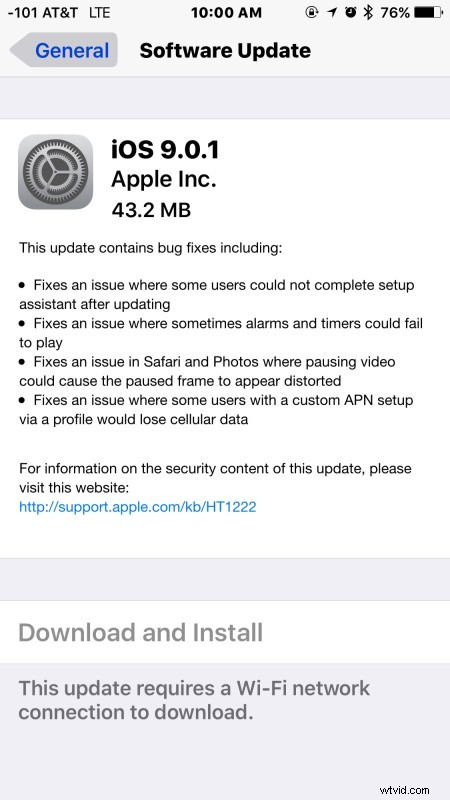
The simplest way to install iOS 9.0.1 is to use the OTA download mechanism built into the Settings app of iOS, where the delta update weighs around 45MB:
- Join a wi-fi network with the iOS device
- Backup the iPhone, iPad, or iPod touch – don’t skip this
- Open the Settings app and go to “General” followed by “Software Update”
- Choose “Download and Install”
As usual with an iOS update, the device will reboot to complete the installation.
Note: Some users are reporting the update is not appearing for them, if you open Software Update and do not see update, try this to make the latest iOS version appear.
iOS 9.0.1 IPSW Firmware Download Links
Firmware for iOS 9.0.1 IPSW is available to download from Apple servers at the links below:
- iPhone 6S Plus 8,1 (13A405)
- iPhone 6S 8,2 (13A405)
- iPhone 6 Plus
- iPhone 6
- iPhone 5S GSM
- iPhone 5S CDMA
- iPhone 5 GSM
- iPhone 5 CDMA
- iPhone 5C GSM
- iPhone 5C CDMA
- iPhone 4S Dualband
- iPod touch 6th generation 7,1
- iPod touch 5th generation 5,1
- iPad Air 2 Wi-Fi
- iPad Air 2 Cellular
- iPad Air Cellular
- iPad Air Wi-Fi
- iPad Air 4,3 China Cellular
- iPad 4 CDMA
- iPad 4 GSM
- iPad 4 Wi-Fi
- iPad 3 Wi-Fi
- iPad 3 GSM
- iPad 3 CDMA
- iPad 2 Wi-Fi 2,4
- iPad 2 Wi-Fi 2,1
- iPad 2 GSM
- iPad 2 CDMA
- iPad Mini 4 Wi-Fi
- iPad Mini 4 Cellular
- iPad Mini CDMA
- iPad Mini GSM
- iPad Mini Wi-Fi
- iPad Mini 2 Cellular
- iPad Mini 2 Wi-Fi
- iPad Mini 2 China
- iPad Mini 3 China
- iPad Mini 3 Wi-Fi
- iPad Mini 3 Cellular
- iPad Mini 4 Wi-Fi
- iPad Mini 4 Cellular
- Updating…
Installing iOS 9.0.1 with firmware is relatively easy, though it’s generally best for advanced users, as it’s overly complex when compared to using the Settings OTA update option or even just your typical iTunes update process.
iOS 9.0.1 Release Notes
Release notes accompanying the iOS 9.0.1 download are as follows:
The release notes have no mention of performance issues to speed up iOS 9, which is sluggish for some users, and there is also no mention of resolving any battery issues with the release.
While the iOS 9.0.1 update mentioned on the Apple Developer Center says the version can not be reverted to a prior software release, users can downgrade to iOS 8.4.1 for the time being, though it requires a backup made from that matching software release, or to setup the device as new.