

The final build of iOS 9.1 is now available for iPhone, iPad, and iPod touch users. The update arrives as build 13b143 and includes various bug fixes and improvements to the software, along with over a hundred new Emoji character icons.
While many bug fixes are noted in the release notes and there is one mention of a performance improvement to multitasking, it remains to be seen if the general iOS 9 sluggishness problem has been addressed.
iOS 9.1 is compatible with all devices that were able to run iOS 9, though the iPhone 6S series gets a specific improvement to Live Photos in the update which is not available for other devices which lack the camera feature.
Updating to iOS 9.1
The simplest way to update to iOS 9.1 is through the Software Update mechanism on the device. This is known as OTA (over the air) and it is quick and easy:
- Back up the iPhone, iPad, or iPod touch if you haven’t done so yet
- Go to the Settings app and choose “General” followed by “Software Update”
- Choose “Download & Install” and agree to the terms of service to begin the process
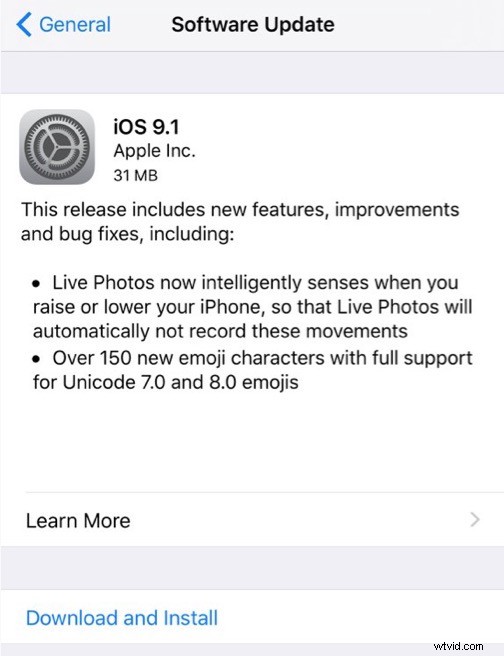
The OTA download weighs in around 300 MB for most devices.
iOS 9.1 will download and complete the installation on it’s own, when finished the device will boot to the latest version.
Another option is for users to update to iOS 9.1 with iTunes, which can be done directly in iTunes by connecting an iPhone or iPad to a computer and clicking on the “Update” button when requested, or by using IPSW firmware files to update a device manually.
Download iOS 9.1 IPSW Firmware Files
Firmware for iOS 9.1 can be downloaded directly from Apple using the links below:
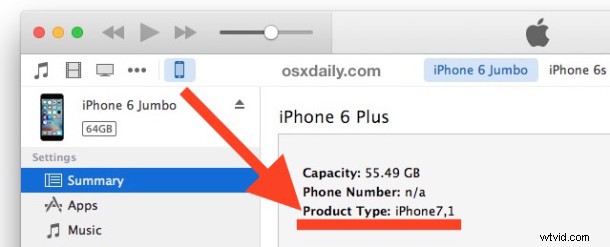
If you aren’t sure which IPSW file to download, you can retrieve the model number of your iPhone, iPad, or iPod touch from iTunes as shown in the screenshot below:
- iPhone 8,2
- iPhone 8,1
- iPhone 7,1
- iPhone 7,2
- iPhone 5,3
- iPhone 5,2
- iPhone 6,2
- iPhone 5,1
- iPhone 5,4
- iPhone 6,1
- iPhone 4,1
- iPad 3,2
- iPad 4,4
- iPad 4,6
- iPad 5,3
- iPad 5,2
- iPad 3,1
- iPad 2,7
- iPad 2,5
- iPad 4,1
- iPad 4,2
- iPad 4,7
- iPad 3,4
- iPad 2,3
- iPad 5,4
- iPad 2,4
- iPad 4,8
- iPad 5,1
- iPad 6,8
- iPad 2,6
- iPad 2,1
- iPad 3,3
- iPad 4,3
- iPad 2,2
- iPad 3,6
- iPad 3,5
- iPad 4,5
- iPad 6,7
- iPad 4,9
- iPod touch 7,1
- iPod touch 5,1
Using IPSW to update with firmware is generally considered more advanced.
Release Notes for iOS 9.1
Release notes accompanying iOS 9.1 update are as follows:
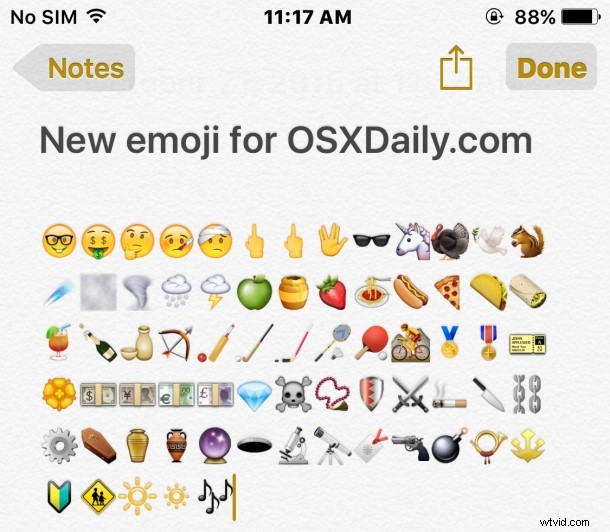
A sample of the new Emoji icons in iOS 9.1 are shown below, these will not render on prior releases of iOS and they show up either blank or as question marks in earlier releases. Some are simply new designs to old emoji as well.
The video below demonstrates updating iOS with OTA:
Separate from the iOS 9.1 update, Apple has also released WatchOS 2.0.1 for Apple Watch, a GM build of tvOS for the new Apple TV, and OS X 10.11.1 update for Mac users. iTunes 12.3.1 has also been released to accompany the software updates.
Troubleshooting iOS 9.1 Update
If you see an “Unable to Check for Update” error message, you’ll likely need to reboot the iPhone or iPad to resolve the error.
If you continue to see that Unable to Check for Update error or a variety of other errors, the best approach may be to connect the iPhone or iPad to a computer and update through iTunes after making a backup of the device.