
Fit the whole video on Instagram in three steps
Aspect ratio is the height/width correlation, and apparently, it depends on the device screen size. The most common one is the above-mentioned proportion 16:9, which means that a visual has 16 pixels long by 9 pixels broad. Other formats include 18:9 and 19:9 ratios.
Therefore, in the majority of cases, a recorded video is taller than 4:5. Luckily, there is an easy way to make a video fit on Instagram. You can just resize it and save all the beautiful frames by adding white or black borders.
Meet a handy free service by Clideo that allows you to fit videos to any social media without cropping. One of the best things is that there is no need to download any app as our service works online. You may open it in any browser you prefer, just make sure that you have a stable internet connection.
Follow the three steps below to get the job done in a few moments:
Upload a recording
Open the Video Resizer by Clideo. Click on the big blue button to upload a clip from Android, iPhone, PC or Mac. Add it from cloud storage by clicking on the right side of the button.

The tool supports almost all the existing video formats, including AVI, MP4, ASF, FLV, 3G2, 3GP and others.
Resize the video to fit Instagram
The tool has ready presets for all the major social media – just choose the needed one. You may also change the scope by clicking Plus/Minus signs. To alter the position of the visual, move it in the necessary direction with the arrows below the player.
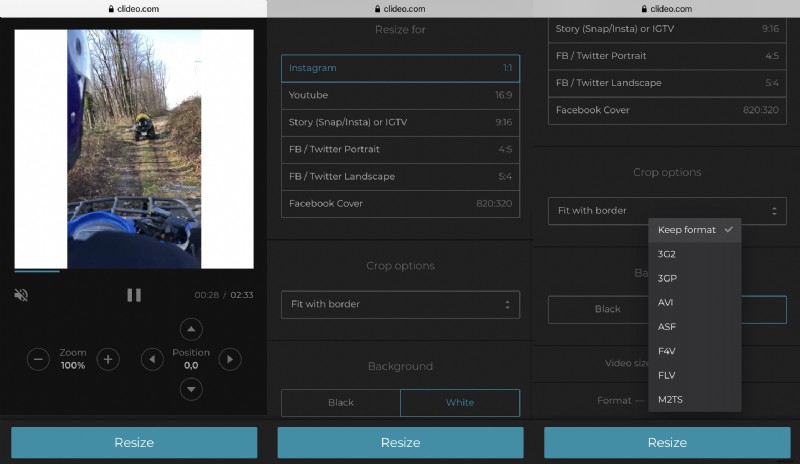
Don’t forget to choose an output format at this step. When everything is nice and neat, hit “Resize”.
Download your video ready for posting
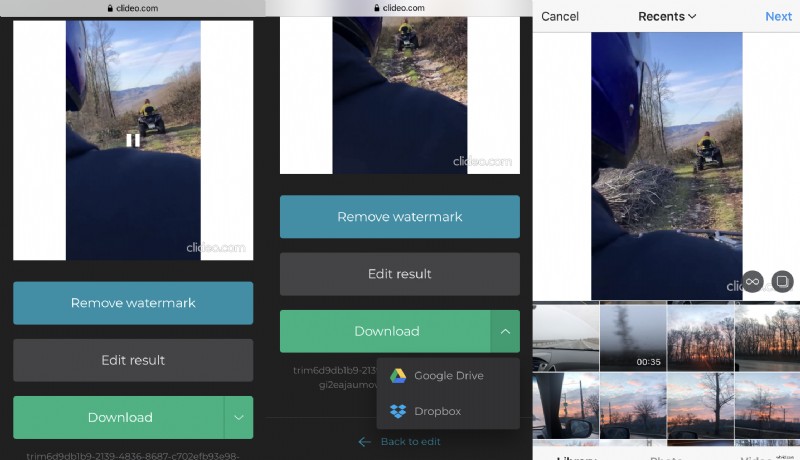
It’s time to save your creation to your personal device. There is also an option to upload it to Google Drive or Dropbox if you want. Then just add it to Instagram without any extra actions!
If you still think that cropping the video to fit Instagram is the better way, use our perfect tool for the purpose. It has the necessary presets for your Story and Square posts, so you won’t waste time on the side alignment.