
Sometimes, you have to crop a photo to make it fit on Instagram. How to crop photos? Is there any way to make pictures fit on Instagram without cropping? In this post, you will learn two methods of how to make a picture fit on Instagram.
It is necessary to learn the Instagram photo size before knowing how to make a picture fit on Instagram. What are recommended dimensions for Instagram? (Try MiniTool MovieMaker to make a cool Instagram video.)
Instagram portrait photo size: 1080 x 1350 px (4:5)
Instagram landscape photo size: 1080 x 608 px (1.91:1)
Instagram square photo size: 1080 x 1080 px (1:1)
Instagram Story size: 1080 x 1920 px (9:16)
IGTV cover photo size: 420 x 654 px (1:1.55)
Instagram profile photo size: 360 x 360 px (1:1)
Method 1. How to Make a Picture Fit on Instagram with Cropping
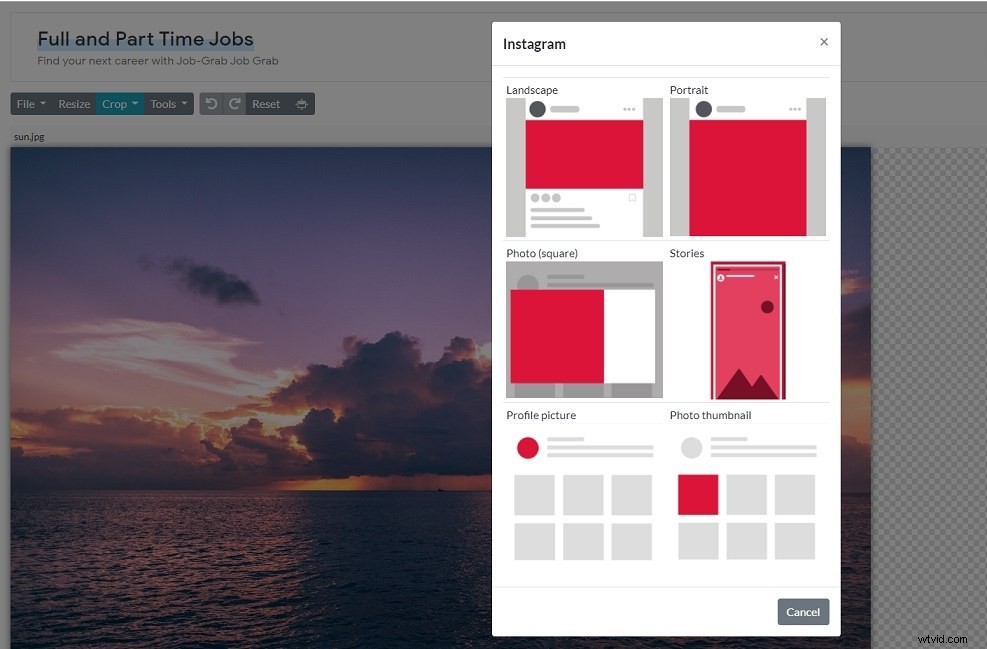
You can use a photo cropper to crop photos to fit Instagram. Photo Resizer is highly recommended here. It offers 6 options to make a picture fit on Instagram: landscape, Portrait, Square, Stories, Profile picture, Photo thumbnail. Apart from that, Photo Resizer also lets you crop photos for Facebook, Twitter, LinkedIn, Tumblr, YouTube and define custom dimensions. It has a set of tools that you can use to flip, rotate, erase, blur, sharpen photos and draw shapes, text on photos.
Here’s how to make a picture fit on Instagram without borders.
Step 1. Open the Photo Resizer website: https://www.photoresizer.com.
Step 2. Click File and choose Open… to import the photo.
Step 3. After uploading this photo, click Crop and select Instagram from the drop-down menu.
Step 4. Choose the desired option and click the Apply button.
Step 5. Finally, navigate to File > Save image as… and select the output format you want. Rename the file as needed and click Save Image.
Note: Image formats supported by Instagram are JPEG, PNG, and BMP.Method 2. How to Make a Picture Fit on Instagram without Cropping
If you want to post a full-size picture on Instagram without cropping, you can try Microsoft Paint or iLoveIMG.
Microsoft Paint
Microsoft Paint is a built-in photo editor of Windows. It lets you resize photos by percentage and pixels without cropping them.
Here’s how:
Step 1. Find the picture you want to resize for Instagram and right-click on it.
Step 2. Choose Open with > Paint to open the picture with Paint.
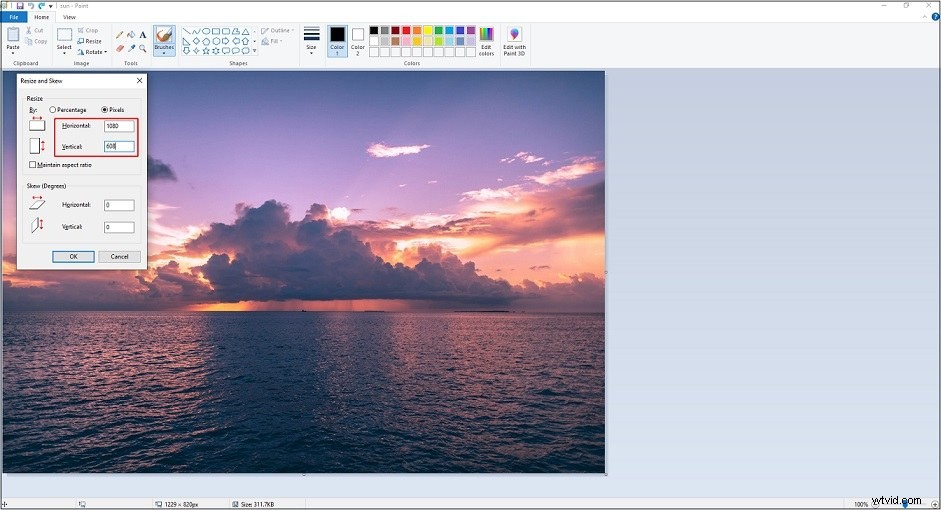
Step 3. Click Resize. In the pop-up window, choose Pixels and uncheck the Maintain aspect ratio option.
Step 4. Enter “1080” in the Horizontal box and “608” in the Vertical box. Click OK to apply the changes.
Step 5. Click File > Save as to save the image in JPG format.
iLoveIMG
Another option to resize photo for Instagram is iLoveIMG. It’s an online photo resizer working in any browser.
How to make pictures fit on Instagram without cropping online? Take the following steps.
Step 1. Visit the iLoveIMG website: https://www.iloveimg.com.
Step 2. Click RESIZE IMAGE and upload the pictures.
Step 3. Choose the resize option By pixels, uncheck the Maintain aspect ratio box, and enter “1080” in the Width box and “608” in the Height box.
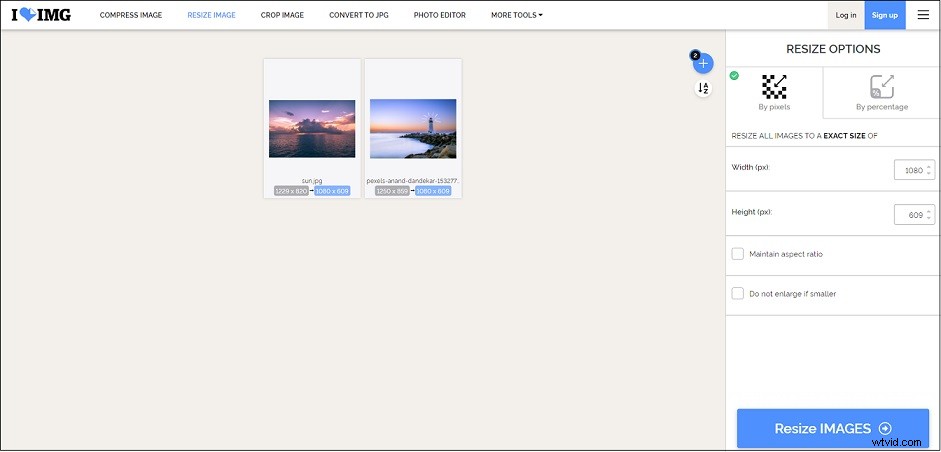
Step 4. Click Resize IMAGES to process your images. After the process finishes, download them to your device.
Conclusion
Two effective methods to make a picture fit on Instagram are mentioned in this post. Now, resize your photo and post it on Instagram without borders.