

Live Text is useful and interesting feature that allows users to select any text, words, or numbers found within an image, and then copy, define, lookup, or search for that selected text. For iPhone and iPad users, this can be convenient for many obvious use cases, but for some users it can also be frustrating as the text selection tools may show up when attempting to adjust a photo, or when you don’t want to actually select text within a photo or picture.
If you would like to turn off Live Text on iPhone or iPad, read along and you’ll have the feature disabled momentarily.
Turning Off Live Text on iPhone & iPad
Disabling Live Text is easy:
- Open the Settings app
- Go to “General” and then choose “Language & Region”
- Switch the toggle for “Live Text” to the OFF position
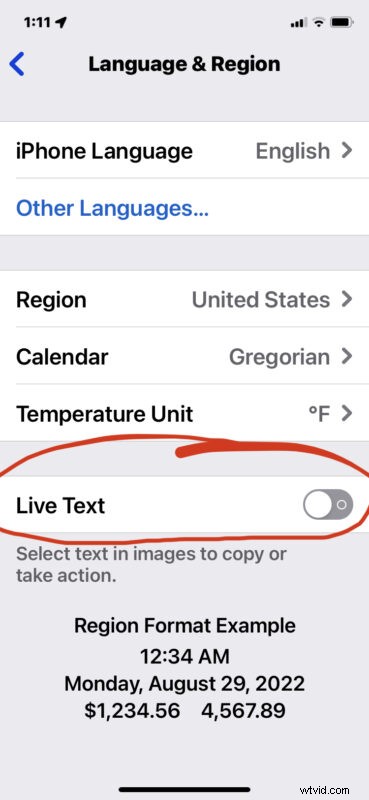
Now if you go to select text within a photo, it will not work anymore.
Some users may want to just temporarily turn this feature off as they work on a particular photo or image project, in which case turning it back on when finished is desired, so that you can continue to use the Live Text feature for selecting any characters found within a photo or picture.
How to to Enable Live Text on iPhone & iPad
Enabling Live Text is a flip of a switch:
- Open the “Settings” app on iPhone or iPad
- Go to “General” and then to “Language & Region”
- Switch the toggle for “Live Text” to the ON position
With Live Text back on, you can instantly use the feature again for anything, whether copying and pasting text from pictures or using it to look up words, or whatever else you use it for.
Whether you use the Live Text feature or not, it’s easy to make the settings adjustment to suit your needs.
Do you use Live Text often on iPhone or iPad? Did you turn the feature off or do you leave it on? Let us know your thoughts and experiences with Live Text in the comments.