

Do you regularly use the Reddit app? If so, have you ever wanted to keep track of all the posts you’ve been viewing on Reddit? Well, Reddit allows you to view your browsing history that shows all the posts that you’ve viewed from the iPhone app.
Reddit’s browsing history feature works pretty much as you’d expect. It’s similar to the browsing history on web browsers, except for the fact that instead of websites, they’re all just Reddit posts. You can see the posts you’ve gone through as long as you’re signed into the app with your Reddit account.
This obviously applies to using the Reddit app, but if you’re using Reddit from the web you can search Safari history or browse through Safari history on iPhone or iPad too.
Viewing Reddit Browsing History on iPhone
First and foremost, make sure you’re logged into the Reddit app with your user account. Although we’ll be focusing on the iPhone, you can use the following steps on your iPad too. Here’s what you need to do:
- Launch the Reddit app and tap on your profile icon located at the top-left corner of the screen.

- This will bring up the hidden left pane which shows the app menu items. Here, tap on the “History” option to proceed.
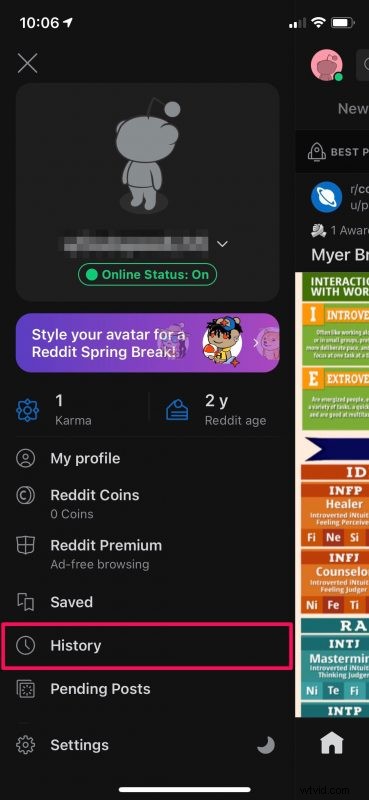
- Now, you’ll be able to see all the posts you’ve viewed recently on Reddit. To filter down your results even further, tap on “Recent” as shown below.

- You can now choose to view the posts you’ve upvoted, downvoted, or hidden with the additional options you have.

There you go. Now, you know exactly how to fully utilize the browsing history feature in Reddit.
From now on, you can utilize this feature if you ever want to go back and find a post that you previously viewed and you’re not sure which subreddit it was from. All the browsing history that you see in the app is local to the device you’re using. Therefore, if you use multiple devices to browse Reddit, you won’t be able to find the same history.
It’s definitely worth pointing out that your history is not entirely accurate. It depends on how you scroll through your Reddit feed. If you scroll through posts quickly, the posts that you see on your screen won’t show up in your history. However, if you slow down to view a post even for a second, it will be added to your browsing history.
Having said all that, if you’re a privacy buff who likes to delete your browsing history every now and then, you can head over to Settings from the app menu and tap on Clear local history. Also, if you don’t want Reddit to save the local history temporarily, you can switch to the hidden Anonymous user in the app.
We hope you were able to keep track of all the posts you’ve been skimming by checking your browsing history. How often do you use it to go back to an old post? Do you plan on clearing your browsing history? Share with us your thoughts as well as your experiences in the comments section down below. Feel free to drop your valuable feedback as well.