
 Audiophiles who want to listen to the highest quality audio streaming from Apple Music and iTunes Radio from the Music app when on the go can enable an optional high quality streaming option in iOS Music settings. While this improves the sound quality and bitrate of the songs you listen to over cellular connections, the obvious downside is that Music streaming will use more cellular data, so this is a feature perhaps best limited to iPhone users with unlimited data plans, or those who don’t care about their cellular phone bill for whatever reason.
This works for streaming the highest possible quality music from Apple Music, iTunes Radio, iTunes Match, and any songs from an iTunes iCloud library.
Enabling High Quality Mobile Music on iPhone
- Open the Settings app on iPhone and go to “Music”
- Scroll down to “Cellular Data” and toggle the switch for “High Quality Streaming” to the ON position (you may need to enable “Use Cellular Data” as well if you turned it off at some point)
- Return to the Music app and stream a station or song as usual, the highest quality audio will now play rather than a compressed bitrate
(Note that modern versions of iOS will label this as “High Quality Streaming” and older versions as “High Quality on Cellular”)
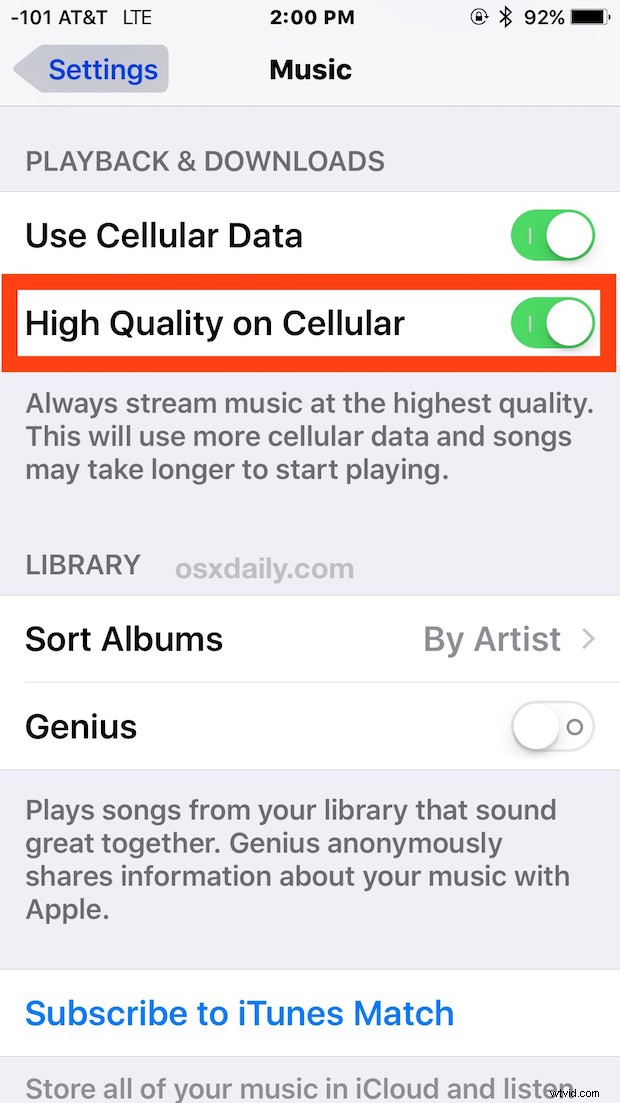
Again, only enable this if you either have an abundance of cellular data, or if you feel like shuffling over more money to your cellular data provider for consuming more than your cellular data allotment. This absolutely will use more cellular data, how much more depends on the songs and how much music you stream.
Aside from the increased cellular data usage, the sound quality is notably better, particularly if you have a great sound system in a car or elsewhere to really take advantage to the higher bitrate music stream. The quality of the speakers definitely matters as well, because many users may not even notice the difference on lower end stereo systems. And if you’re listening to the music stream on a little Bluetooth speaker set or average car speakers, you’re probably wasting bandwidth, as the difference in audio quality will likely not be noticeable.
If you don’t mind the extra bandwidth usage or have unlimited data, you’ll want to be sure that LTE is not disabled for best results.