

Apple has started production of the next generation iPhone models which are to be equipped with Force Touch screen features, according to a new report from Bloomberg. Force Touch is able to detect differences in the amount of pressure placed on the display, offering different interactions as a result.
The Bloomberg report appears to confirm an earlier rumor from the Wall Street Journal about the inclusion of the new display technology on iPhones.
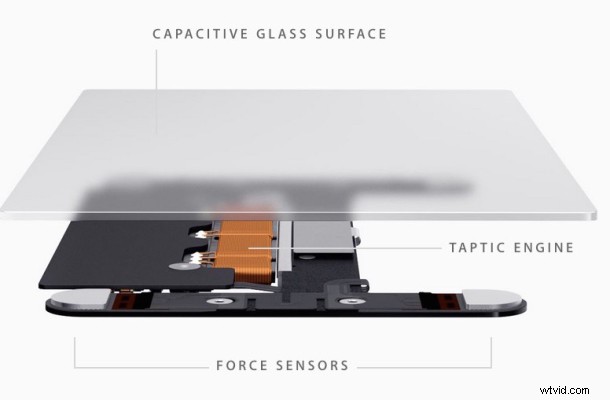
Currently, Apple Watch is the only Apple product with a Force Touch display, though the same Force Touch technology is also in use on new MacBook and MacBook Pro glass trackpads. The Force Touch features offer a variety of actions depending on where a firm press is used, performing actions ranging from clearing out notifications to summoning a dictionary definition. The Force Touch screen and trackpads also offer physical feedback to the user.
Aside from the addition of Force Touch, the next iPhone is expected to have the same design and 4.7″ and 5.5″ display offerings as existing models.
Other rumors suggest the upcoming iPhone, which might be named iPhone 6s and iPhone 6s Plus, will offer notable improvements to the devices camera, along with increased performance through faster processing and memory.
No release timeline has been specified for when the next generation iPhone will be released, but typically Apple unveils new models in the fall, typically alongside the public release of new iOS software. Apple has said that iOS 9 will debut this fall to the public.