
How to send large video from iPhone to Email
A common rule: the bigger file has the better quality. But it may cause problems while sending, sharing, or transferring large video files from iPhone to PC, Mac, or another device.
The average maximum video size allowed for sending is 10 MB. Gmail allows sending attachments up to 25 MB, but only if the recipient is also registered on Gmail.
So, to share large video files from the iPhone, you’ll need to compress it first and do it without losing quality.
Our tool is online, so it works on any device including Android, iPhone, and computers. It’s free for files up to 500 MB in size. It’s also intuitively comprehensive, you don’t need any special knowledge or experience to handle it.
Import a video
When you open Video Compressor by Clideo, you’ll spot the big blue button. Hit it to upload a recording from your personal device.
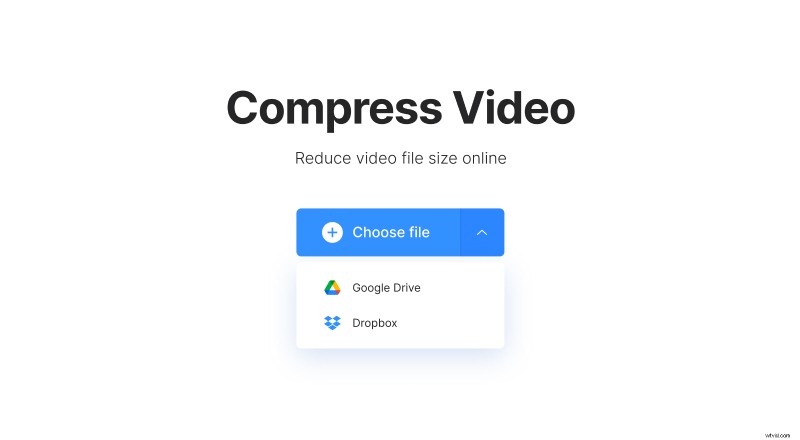
Another option – call a drop-down menu on the right side of this pane and select a video Google Drive or Dropbox.
Wait for video to be compressed
No, it’s not a mistake – you don’t have to do anything as the compression is fully automated. The tool will find the smallest possible file size without a quality loss.
Just let the service do its job and fetch a nice cup of tea in the meantime.
Email a large video from iPhone
When the video is processed, you’ll see its initial and final sizes and the percentage of compression. It may reach up to 95%!
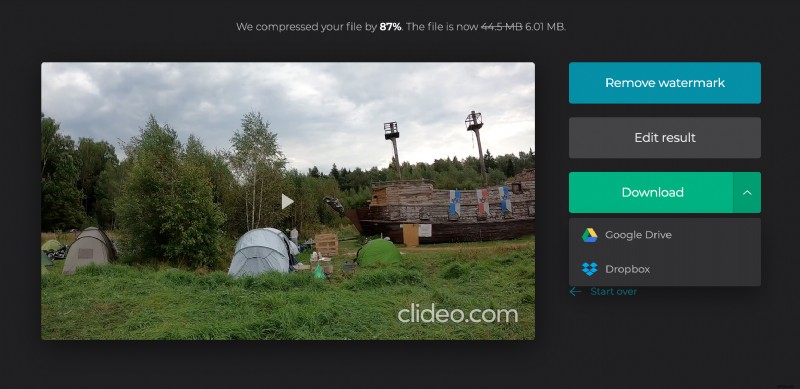
Save the result to your device or cloud. If you want to compress another recording, click “Start over” and upload a new shooting.