
“I need to find an mp3 cutter for Mac OS X that is simple and easy to cut/split an MP3 or other audio files into several parts. I’ve tried Audacity, but it’s kind of complex, and hard to make many cuts in. Does anyone know of any good MP3 cutting software running on Apple MacOS system I could use?”
No matter you want to make personalized ringtones for your cell phone by cutting a specific segment from a favorite song, or intend to insert several different parts from an MP3 file into a presentation, a good MP3 Cutter software will greatly help you with your project.
In this article, we will introduce the most reliable way you can trust to cut MP3 files and convert them to any other desired audio format easily and quickly.
Part 1. Best MP3 Cutter for Mac computer: Wondershare Audio Editor for Mac.
Wondershare Video/Audio editor for Mac is definitely your first choice when it comes to cutting or editing any of your video clips or music files. It is compatible with any operating system covering OS X 10.7 or later(including Mac OS X 10.10 (Yosemite)).
Apart from MP3 we are mainly talking about in this guide, this program is also perfectly compatible with dozens more of another video/audio formats:
- video files such as MP4, FLV, AVI, VOB, etc.;
- Audio files such as AAC, AC3, AIF, AIFF, MP2, MP3, etc.
They are all supported to be imported for cutting/trimming purposes.
Key features:
- Free&Fast download
- Cut any large MP3 files with high precision and without quality loss
- Not just cut, but can also convert, join, trim MP3 and many other music files
- Edit audio speed (fast and slow motion), pitch, or change the voice to something robotic, etc.
- Not just audio, but also available to edit any video files
Part2. How to cut MP3 songs on Mac
Using Wondershare MP3 Cutter is pretty simple. The following step-by-step guide will show you how to cut MP3 easily and quickly.
Step1: Import MP3 files for editing
MP3 clips can be dragged into the media library, or you can directly import video or audio files from portable devices such as your smartphone, digital camera or camcorder etc.
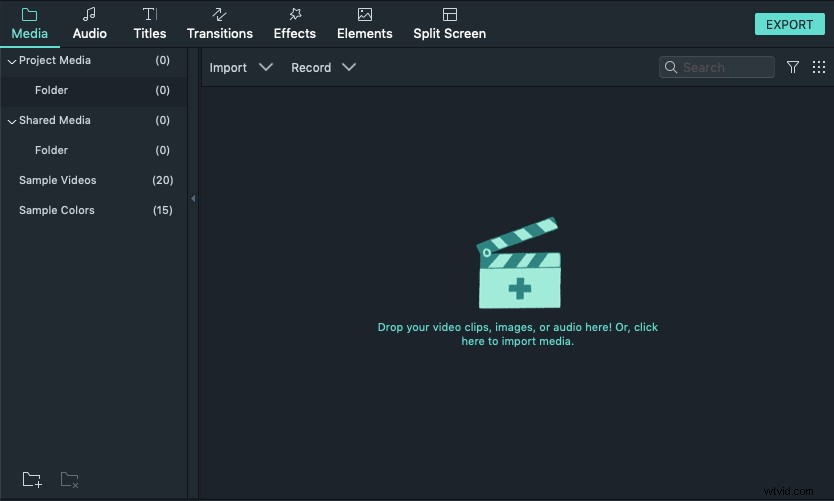
Step2: Drag MP3 files to the timeline below for cutting. Wondershare offers two ways to cut video/audio files. You can either choose to cut from the begging or the end by trimming. Or you can also split it into several segments from the middle.
To cut from the middle, just move the slider to the cutting point, and then click the scissor button to split it into smaller parts.
When done, select the part that you don’t want, click the delete icon to remove it.
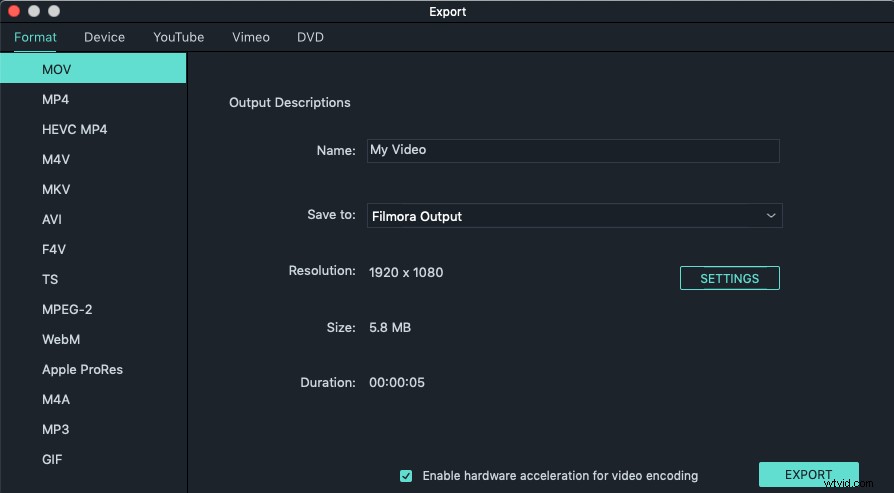
Step3. Export to save
When you finish cutting, click the export button to save your edited project. If you want to save in the original MP3 format, just choose MP3 before you export.
With Wondershare MP3 cutter for Mac, to cut MP3 files is just like a piece of cake. The interface is rather intuitive and thus anyone will master it within several minutes. Download a free copy to try it now: