
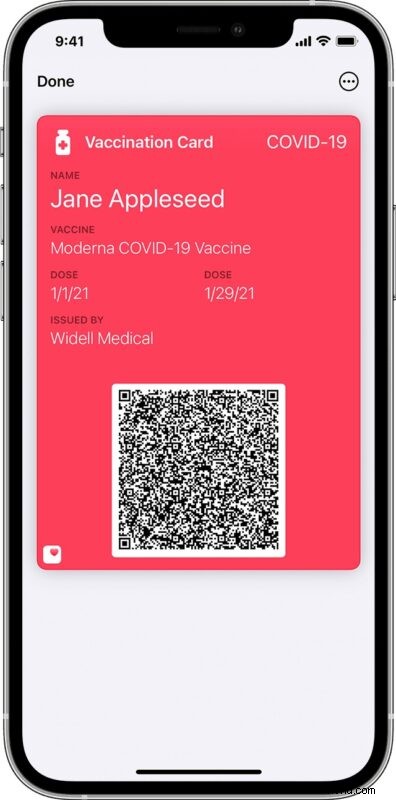
Apple now supports the ability for verifiable COVID vaccination cards to be added to iPhone via the Apple Wallet application. The digital COVID-19 vaccine passport could be useful for situations where you must show your vaccine papers to travel, cross a border, enter into a restaurant, enter a building, or other for example. Rather than carrying around a delicate piece of paper, you can just simply use your iPhone and have a verifiable vaccine record with you instead to serve as your vaccine passport.
The ability to add Covid vaccine cards into Apple Wallet requires the iPhone be running iOS 15.1 or newer, as older versions do not offer this capability.
How to Add COVID-19 Vaccine Card to iPhone Wallet App
Here’s how you can add a Covid-19 vaccination card record to the Apple Wallet app on iPhone.
By QR code
- Request a QR code of your COVID-19 vaccination record from the health provider who injected you
- Using the Camera app of iPhone, scan the provided QR code
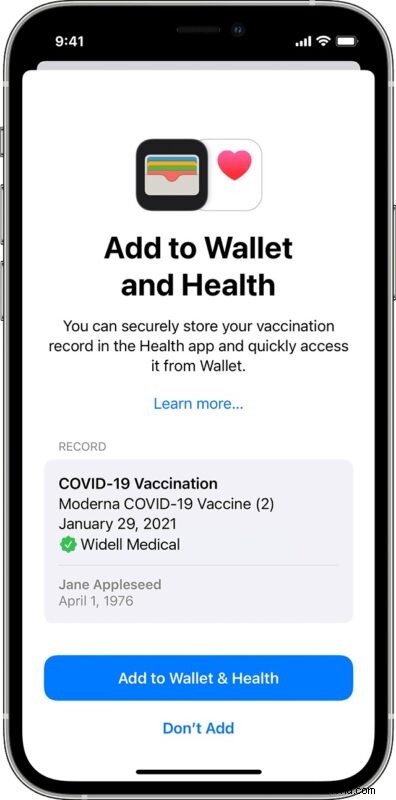
- When the “Add to Wallet and Health” message appears on screen showing the COVID-19 Vaccination data, tap to “Add to Wallet & Health”
- Tap Done
By downloadable file
Optionally, some health providers, HMOs, insurance companies, etc may provide you with a downloadable file to add the verifiable vaccine card to the Wallet app on iPhone. This is also simple to add to iPhone, simply download the vaccine record from the provider, tap “Add to Wallet & Health” and then tap “Done”.
Whether you used the QR code or downloaded file, now the Covid-19 Vaccine record has been added to your Apple Wallet on iPhone, allowing you to use that as your vaccine card pass as needed.
How to Access the Covid-19 Vaccine Pass on iPhone Apple Wallet App
To access your digitally verified COVID-19 vaccine card pass, open the Wallet app on iPhone, then locate the “Vaccination Card” to present the vaccination information as needed.
A QR code also appears on the Vaccination Card screen that can be scanned by authorities to verify the record.
With this feature, if someone asks “May we see your vaccine card, please?” you’ll be able to use the Apple Wallet app to comply with the request.
Can I scan a Covid-19 vaccine card into iPhone?
You can also simply take a photo using the iPhone camera of the Covid-19 vaccine card, and carry that with you.
However, a photo of the COVID-19 vaccine card is not digitally verifiable, and it’s possible that some locations or authorities may not allow a simple photo of the Covid-19 vaccine card to function as a pass or to comply with a request for verification. Instead, they may require a digitally verified vaccine pass, which is available using the methods described above via QR code or the downloadable file from a vaccine provider.
Thus, you can not simply add your physical Covid vaccine card directly into the iPhone Wallet app or Health app.
–
What do you think of the digitally verifiable COVID-19 vaccination records feature in the iPhone Wallet app? Do you think it’s convenient and plan on using it? Do you not like the concept? Do you find the idea of COVID vaccine passports to be exciting, good, interesting, uneventful, a threat to privacy, objectionable, or worse? Let us know your thoughts in the comments.