

Do you want to quickly see the battery percent of your AirPods or AirPods Pro? Thanks to the Control Center on iPhone and iPad, it’s fairly convenient to check the battery life of your wireless earbuds.
Let’s say you’re in the middle of using an application or playing games on your iOS device. With the Control Center, it’s easy to take a quick peek at your AirPods’ remaining battery with just a couple of actions and determine when you need to charge them again.
Read on and you’ll be checking AirPods battery life from Control Center on both the iPhone and iPad in no time.
How to Check AirPods Battery Life from Control Center on iPhone & iPad
Before you go ahead with this procedure, make sure your AirPods are connected to your iPhone or iPad. Accessing the iOS Control Center may vary depending on the device you’re using, so simply follow the steps below.
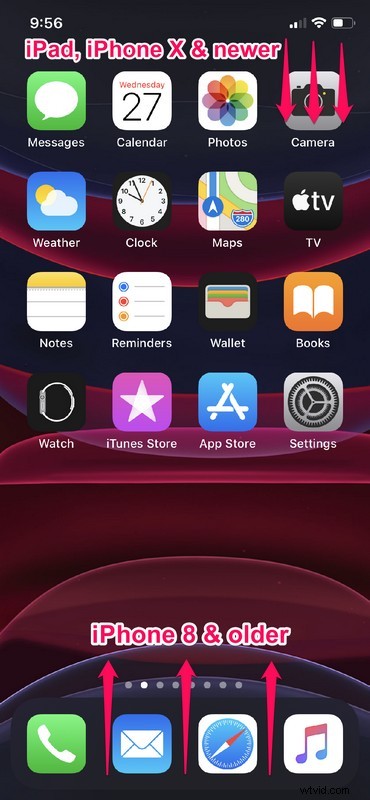
- If you’re using an iPad, iPhone X or newer device, you can access the Control Center by swiping down from the top-right edge of the screen. However, if you’re using an iPhone with a big forehead and chin, like the iPhone 8 or older, simply swipe up from the bottom of your screen as show in the screenshot below, in order to access it.
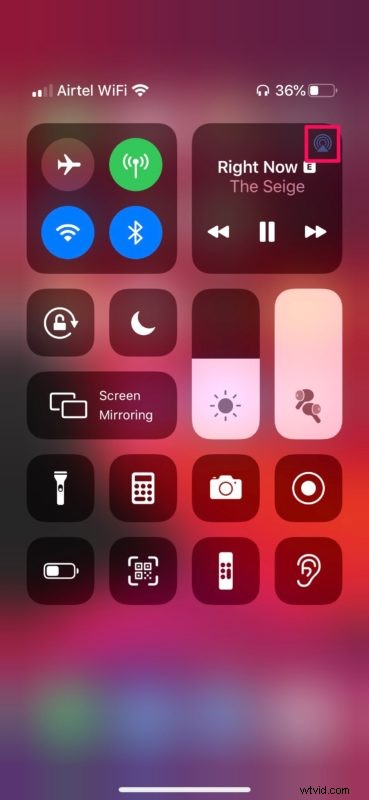
- Simply tap on the “AirPlay” icon in the Playback menu, which is the top-right section within the Control Center.
- Now, you should be able to see the battery percentage of your AirPods or AirPods Pro, displayed right under headphones, as shown below.
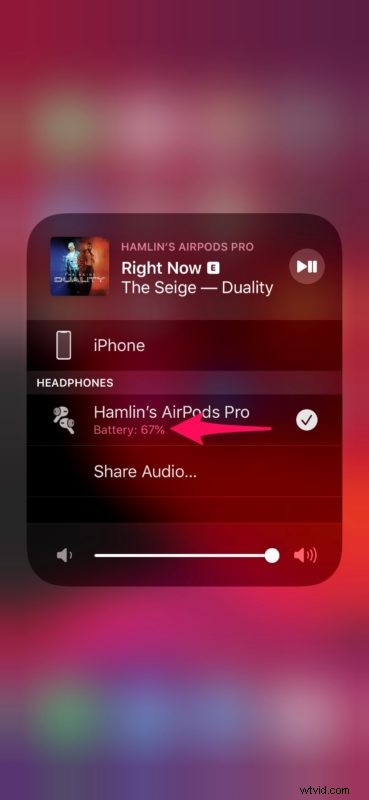
That’s pretty much all you need to do to quickly view the battery percent of your AirPods on your iPhone or iPad.
Alternatively, you can also check the battery life by making use of the Battery widget in Today view. This might be the quickest way to view the battery percentage, especially if you’re on the home screen.
That being said, the Control Center method might still be the quicker way to view the battery life when you’re scrolling through an app, watching videos, listening to music or playing games.
Control Center gives quick access to several functions that are otherwise not easily accessible. Similar to this added convenience, the iOS Control Center houses a bunch of toggles that allows you to quickly enable or disable certain features from the comfort of your home screen or without having to exit the application that you’re using.
Did you manage to view your AirPods battery percent within the Control Center? What other features do you quickly access using the iPadOS / iOS Control Center? Do let us know your thoughts and opinions in the comments section down below.