
Apple has released iOS 9.3.1 for iPhone, iPad, and iPod touch, the new version directly addresses the problem where tapped links would crash or freeze Safari, Messages, Mail, and other apps on iOS devices. This update is particularly important to install if you have been experiencing the URL crashing problem as it fixes the bug and stops tapping links from crashing the device, though users who haven’t been impacted by the bug may find it less urgent to update.
The iOS 9.3.1 build arrives as 13E238 and if downloaded as a delta update it is quite small, arriving at roughly 35MB, making it a quick install.
Updating to iOS 9.3.1
The easiest way to update to iOS 9.3.1 is through the OTA mechanism on the iPhone, IPad, or iPod touch. Be sure to back up the device before beginning.
Note: Do not tap the security information link in the update screen, that will crash the iPhone, iPad, or iPod touch until this bug fix release has been installed.
- Open the Settings app and go to “General” and then to “Software Update”
- When iOS 9.3.1 appears, tap on “Download and Install”
- Agree to the terms & conditions and install the iOS update as usual
Another option is to update to iOS 9.3.1 through iTunes using a Mac or Windows PC. This necessitates connecting the device to a computer, launching iTunes, and choosing the “Update” button within iTunes.
iOS 9.3.1 IPSW Firmware Download Links
Direct download links to iOS 9.3.1 in IPSW firmware format are available from Apple servers below, using IPSW to update is generally considered advanced but is not too complicated.
- iPhone 6s
- iPhone 6s Plus
- iPhone 6
- iPhone 6 Plus
- iPhone SE
- iPhone 5c CDMA
- iPhone 5c GSM
- iPhone 5s CDMA
- iPhone 5s GSM
- iPhone 5 CDMA
- iPhone 5 GSM
- iPhone 4s
- iPad Pro 12 inch Wi-Fi model
- iPad Pro 12 inch Cellular model
- iPad Pro 9 inch Wi-Fi model
- iPad Pro 9 inch Cellular model
- iPad Air 2 Wi-Fi model
- iPad Air 2 Cellular model
- iPad Air Cellular model
- iPad Air Wi-Fi model
- iPad Air China model
- iPad 4th gen CDMA
- iPad 4th gen GSM
- iPad 4th gen Wi-Fi model
- iPad 3 Wi-Fi 3rd gen
- iPad 3 Wi-Fi + Cellular model GSM
- iPad 3 Wi-Fi + Cellular model CDMA
- iPad 2 Wi-Fi (2,4) revised
- iPad 2 Wi-Fi (2,1) original
- iPad 2 Wi-Fi + 3G GSM
- iPad 2 Wi-Fi + 3G CDMA
- iPad Mini CDMA
- iPad Mini GSM
- iPad Mini Wi-Fi model
- iPad Mini 2 Cellular model
- iPad Mini 2 Wi-Fi model
- iPad Mini 2 China
- iPad Mini 3 China
- iPad Mini 3 Wi-Fi model
- iPad Mini 3 Cellular model
- iPad Mini 4 Wi-Fi model
- iPad Mini 4 Cellular model
- iPod touch 5th gen 5,1
- iPod touch 6th gen (7,1
iOS 9.3.1 Release Notes
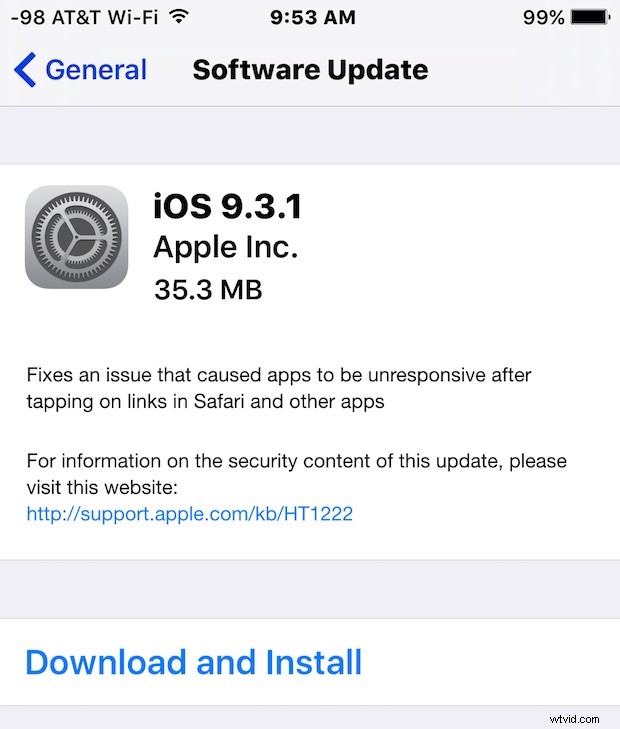
The brief release notes attached to iOS 9.3.1 state the update “Fixes an issue that caused apps to be unresponsive after tapping on links in Safari and other apps”.
To be perfectly clear, installing iOS 9.3.1 completely fixes the link crashing bug, so if you have Safari crashing or freezing when links are clicked, or if other strange URL behavior is noted, install this update to fix the problem. Because the update fixes the problem, it voids the need to follow this set of relatively complicated set of steps that can fix the URL crashing issue. This means you can also re-enable Javascript if you turned it off as a troubleshooting step with the prior iOS update version. If you did not have any problems with the iOS 9.3 update, you still may want to update to iOS 9.3.1 to be current anyway, but it’s likely less pressing compared to users who are unable to access Safari, Mail, Messages, and other apps without them crashing.