

Live Photos are a great new feature for the iPhone camera, and while you can easily share them with other iPhone and iPad users or to a Mac, they come across as little movies unless the user has Live Photo compatible iPhone. Mysteriously missing is the ability to convert and save Live Photos as an animated gif directly from the iPhone Photos app, but with the help of a third party application, you can convert any Live Photo into an animated gif with minimal effort.
Before getting started, take any Live Photo with the iPhone camera that you want to convert if you haven’t done so already (you’ll need to enable the Live Photo feature if you turned it off).
How to Convert a Live Photo to Animated GIF on iPhone with GIF Toaster
- Download the GIF Toaster app for free from the App Store for iOS
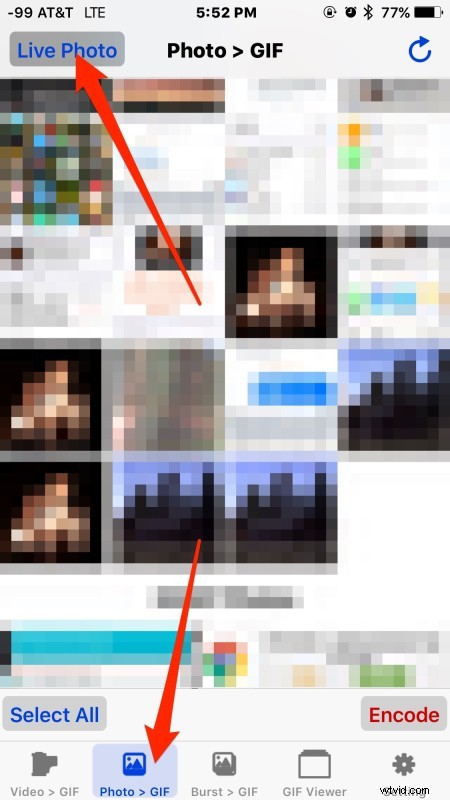
- Launch GIF Toaster and tap on “Photo > Gif” then tap on “Live Photo” in the corner to show only Live Photos
- Select the Live Photo you wish to convert to gif then tap “Encode”
- Adjust the GIF settings as desired, including frame rate (FPS), range, playback speed, and the resolution size of the gif (note that higher resolution gifs require the app to be paid for, but more on that in a moment*)
- Choose “Start Encoding” and when finished, choose “Export to Camera Roll” or “Open In…” to message or email the animated gif
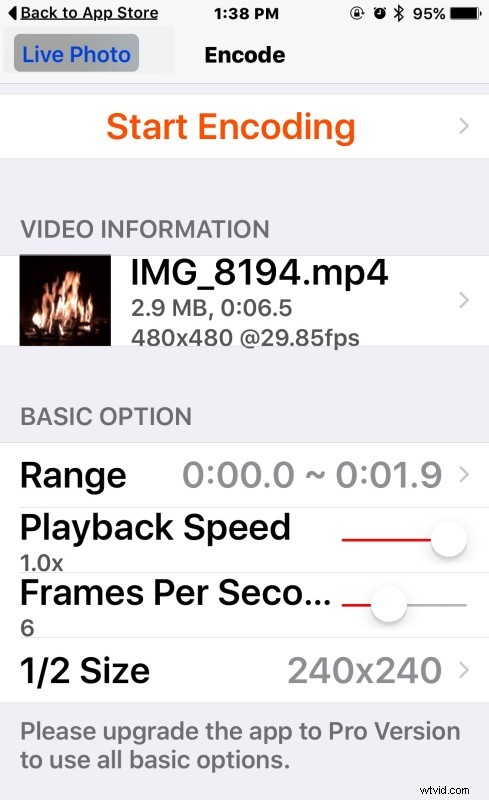
Very easy, here’s a Live Photo converted into an animated GIF of a fireplace that was created with the app.
* GIF Toaster works well but has some limitations and some quirks in the user interface, so while it’s great for limited usage, if you plan on converting many Live Photos to animated gifs, you may want to try some other apps for Live Photo conversions, and the $2 Live GIF app or $2 Lively app are perhaps better choices. Nonetheless, for a free offering, GIF Toaster gets the job done well, and can also convert video to animated gifs as well.
It’s worth mentioning that if you just want to make animated gifs from still pictures or videos, GifMill works great for that purpose as well, which is another free app for iOS we’ve discussed before.
Animated GIFs are popular enough that the ability to generate one out of a Live Photo should probably be included natively on the iPhone Camera app or Photos app, perhaps such a feature will arrive in the future, but until (if ever) that changes, enjoy the apps to make your own animated GIFS!