REC

Recommended: Video Production, Editing & Gear Maintenance Guide

 WTVID >> WTVID >  >> Video Editing >> Adobe Audition

How to Split Audio Tracks in Adobe Premiere Pro: Razor Tool Guide

You can split audio in Premiere Pro by using a Razor Tool (C).

Here’s how to quickly split Audio in Premiere Pro:

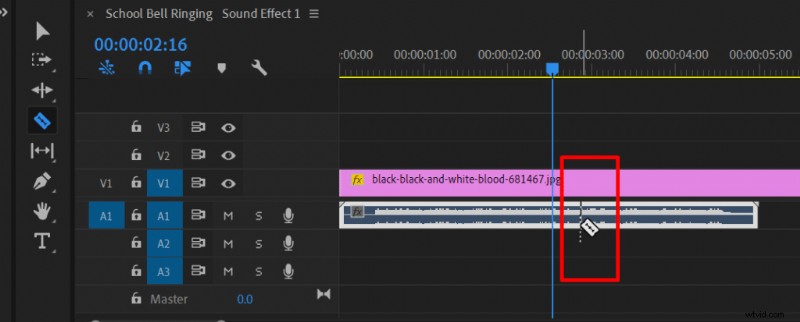
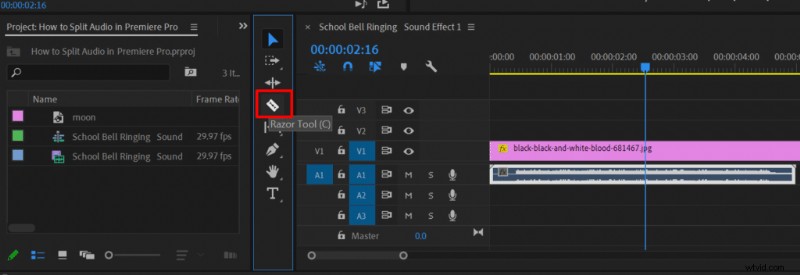
  1. Once you have an audio track click onto a Razor Tool in Premiere Pro’s tools menu next to a timeline, or press the shortcut key C.
  2. Select a place which you want to Split your audio track and click the left mouse button.
How to Split Audio Tracks in Adobe Premiere Pro: Razor Tool Guide How to Split Audio Tracks in Adobe Premiere Pro: Razor Tool Guide

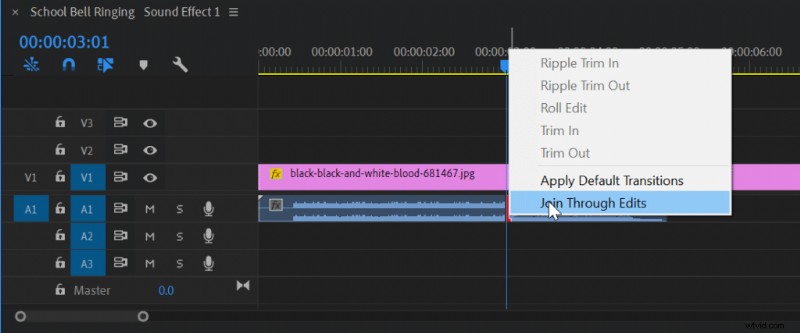
If you wish to merge two separate audio clips into a single clip then you have to align them one to another, click the right mouse button onto the line separating them and choose Join Through Edits from the menu.
How to Split Audio Tracks in Adobe Premiere Pro: Razor Tool Guide

You can find more information about improving audio quality in Premiere Pro here.


  1. Seamlessly Crossfade Audio Tracks in Premiere Pro & Final Cut Pro X: Quick Guide

  2. Expert Guide: Perfectly Sync Audio to Video in Filmora Pro & Premiere Pro

  3. How to Merge Video and Audio Effortlessly with Wondershare Filmora

  4. How to Effortlessly Remove Audio Clicks in Adobe Premiere Pro: Step-by-Step Guide

  5. Effortlessly Remove Breaths from Audio in Adobe Premiere Pro: Expert Guide

Adobe Audition
  1. Effortlessly Adjust Music Length in Adobe Premiere Pro with 2022 Remix Feature

  2. 4 Simple Ways to Fade Out Audio in Adobe Premiere Pro

  3. Submix in Premiere Pro: What It Is and How to Create & Use It Effectively

  4. Expert Guide: How to Perfectly Sync Audio and Video in Adobe Premiere

  5. Eliminate Audio Noise Like a Pro: Adobe Audition & Premiere Pro Tutorial

  6. How to Remove Echo from Audio in Adobe Premiere Pro: Step-by-Step Guide

  7. How to Split Audio Tracks in Audacity: Step-by-Step Guide

  8. Expert Guide: Enhance Audio Quality in Adobe Premiere Pro with Built-in Tools