
REC

Recommended: Video Production, Editing & Gear Maintenance Guide

 WTVID >> WTVID >  >> Video Editing >> Adobe Audition

How to Apply Audio Distortion in Adobe Premiere Pro: Step-by-Step Guide

Audio distortion is created by overloading the audio input. Naturally, distortion occurs when we set up the gain level too high or when the input volume is too loud. However, you can distort audio in Premiere Pro using a Distortion effect from the Premiere Pro’s Audio effect library.

Distort audio in Premiere Pro:

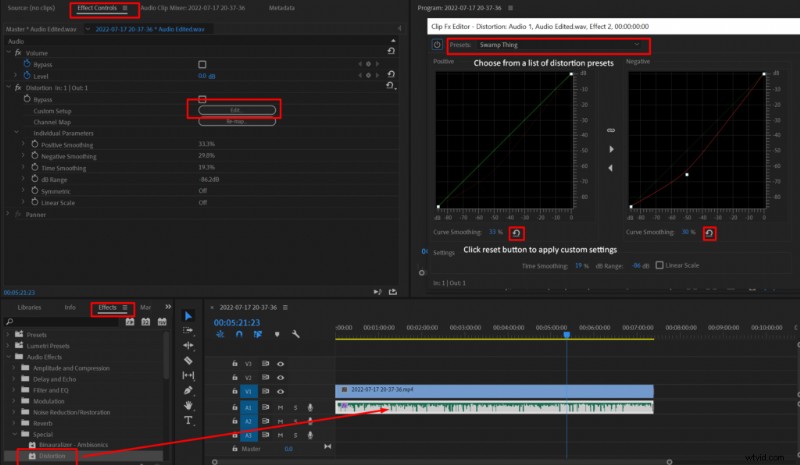
  1. Add your audio track to the timeline
  2. Go to Effects->Audio Effects->Special->Distortion
  3. Drag the Distortion effect onto your audio
  4. Go to Effect Controls->Distortion->Custom Setup->Edit
  5. Choose Distortion preset or create a custom effect
How to Apply Audio Distortion in Adobe Premiere Pro: Step-by-Step Guide

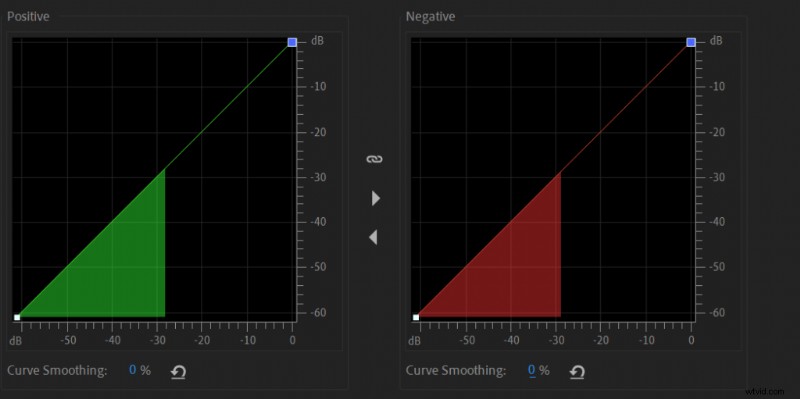
When the distortion graphic is diagonal, there is 0 distortion to your audio. To make the audio distorted, you’ll have to move the graphic towards the left and the top. The closer to the top left corner the more distorted your audio will become and it applies to both positive and negative graphics.
How to Apply Audio Distortion in Adobe Premiere Pro: Step-by-Step Guide

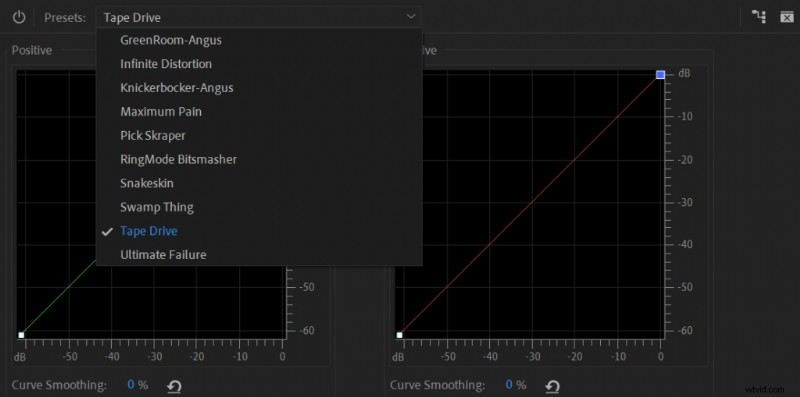
I recommend trying out presets as they cover most options of what you would want from Distortion effect.
How to Apply Audio Distortion in Adobe Premiere Pro: Step-by-Step Guide

Harsh distortion presets:

  • Infinite Distortion
  • Maximum Pain
  • RingMode Bitsmasher
  • Ultimate failure

Medium distortion presets:

  • Knickerbocker-Angus
  • Pick Skraper
  • Tape Drive

Subtle distortion presets:

  • GreenRoom-Angus
  • Snakeskin
  • Swamp Thing

Alternatively, you can distort your audio naturally by following these tips:

  • If you’re using a pre-amp or audio interface record audio at a maximum gain level
  • Get as close to the microphone as possible
  • Speak into the microphone as loud as possible

  1. Effortlessly Adjust Music Length in Adobe Premiere Pro with 2022 Remix Feature

  2. 4 Simple Ways to Fade Out Audio in Adobe Premiere Pro

  3. Speed Up Videos in Premiere Pro Without Audio Distortion: Pro Tutorial

  4. Expert Guide: Enhance Audio Quality in Adobe Premiere Pro with Built-in Tools

  5. How to Split Audio Tracks in Adobe Premiere Pro: Razor Tool Guide

Adobe Audition
  1. Seamlessly Crossfade Audio Tracks in Premiere Pro & Final Cut Pro X: Quick Guide

  2. Submix in Premiere Pro: What It Is and How to Create & Use It Effectively

  3. Step-by-Step Guide: Create Audio Keyframes in Adobe Premiere Pro on Mac

  4. Master the Audio Track Mixer in Adobe Premiere Pro: Step-by-Step Guide

  5. Expert Guide: Perfectly Sync Audio to Video in Filmora Pro & Premiere Pro

  6. How to Fix No Audio in Adobe Premiere Pro: Step-by-Step Troubleshooting Guide

  7. Expert Guide: Sync Audio and Video Perfectly in Adobe Premiere Pro

  8. Expert Guide: How to Sync Audio and Video Perfectly in Adobe Premiere Pro