
REC

Recommended: Video Production, Editing & Gear Maintenance Guide

 WTVID >> WTVID >  >> Video Editing >> Adobe Audition

How to Boost Audio Volume in Adobe Premiere Pro: Easy Step-by-Step Guide

You can increase or decrease audio in Volume in Premiere Pro in two ways. One of which is using Premiere Pro’s built-in audio editor. A second way, if you have access to Adobe Audition, you can export your audio to Adobe Audition and any changes you have made within the dedicated audio editor will be implemented in Premiere Pro. Also, this way gives you access to multiple audio editing tools available within Adobe Audition.

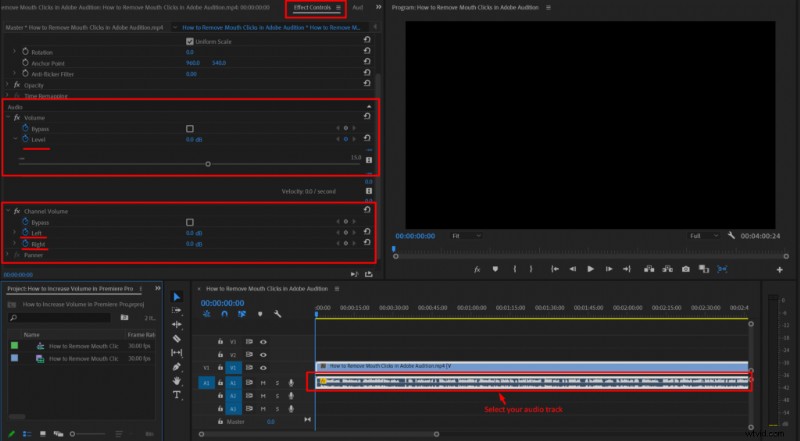
The easiest way to quickly control your video volume is the following:

  1. Select your audio in a Premiere Pro timeline
  2. Click Effect Control
  3. Go to the Audio section in the Effect Control panel
  4. Adjust Level

If you have a stereo track and want to control the audio volume of different channels, then go to a Channel Volume section in the Effect Control panel and adjust the left and right channels accordingly.
How to Boost Audio Volume in Adobe Premiere Pro: Easy Step-by-Step Guide

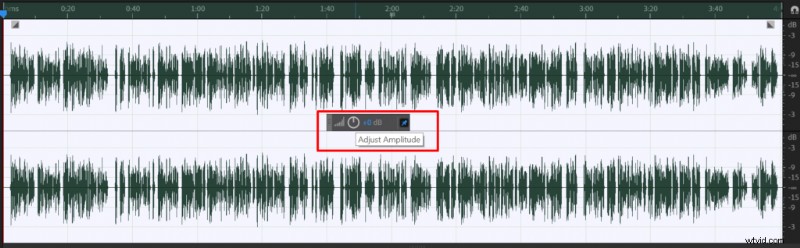
You can also edit your audio volume in Adobe Audition if you have access to it.

Here’s how to edit audio volume in Premiere Pro using Adobe Audition:

  1. Click the right mouse button on your audio in Premiere Pro timeline
  2. Choose Edit Clip In Adobe Audition
  3. Select your audio in Adobe Audition by double clicking on it
  4. Adjust the audio volume by using Adjust Amplitude wheel
  5. Click CTRL+S and your audio will automatically be adjusted in Premiere Pro.
How to Boost Audio Volume in Adobe Premiere Pro: Easy Step-by-Step Guide
  1. How to Boost Audio Volume Without Distortion: Expert Guide in Adobe Audition

  2. Boost Audio Volume in Audacity Without Clipping: Proven Step-by-Step Guide

  3. How to Remove Echo from Audio in Adobe Premiere Pro: Step-by-Step Guide

  4. Expert Guide: Enhance Audio Quality in Adobe Premiere Pro with Built-in Tools

  5. How to Split Audio Tracks in Adobe Premiere Pro: Razor Tool Guide

Adobe Audition
  1. Effortlessly Adjust Music Length in Adobe Premiere Pro with 2022 Remix Feature

  2. Seamlessly Crossfade Audio Tracks in Premiere Pro & Final Cut Pro X: Quick Guide

  3. 4 Simple Ways to Fade Out Audio in Adobe Premiere Pro

  4. Submix in Premiere Pro: What It Is and How to Create & Use It Effectively

  5. Step-by-Step Guide: Create Audio Keyframes in Adobe Premiere Pro on Mac

  6. How to Fix No Audio in Adobe Premiere Pro: Step-by-Step Troubleshooting Guide

  7. Expert Guide: Sync Audio and Video Perfectly in Adobe Premiere Pro

  8. Expert Guide: How to Sync Audio and Video Perfectly in Adobe Premiere Pro