REC

Recommended: Video Production, Editing & Gear Maintenance Guide

 WTVID >> WTVID >  >> Video Editing >> Adobe Audition

How to Create Custom Keyboard Shortcuts in Audacity: Step-by-Step Guide

You can bind your keyboard keys to particular effects, tools and functions in Audacity, making your audio editing process significantly faster.

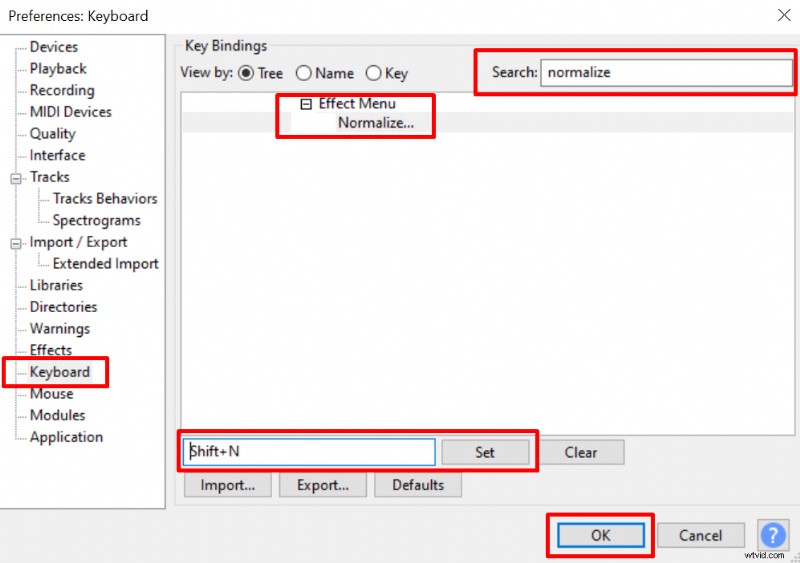
To create keyboard shortcuts in Audacity follow these steps:

  1. Go to File->Preferences->Keyboard
  2. Choose the effect from the list or search for it
  3. Insert a keyboard key or a combination of keys into a box at the bottom
  4. Click Set and OK.
How to Create Custom Keyboard Shortcuts in Audacity: Step-by-Step Guide

You can choose a single key, a double combination such as Shift+Letter, CTRL+Letter, ALT+Letter or even a triple combination such as CTRL+Shift+Letter and etc by holding the Shift, CTRL or ALT before choosing the key. Having quick shortcuts for your most used effects, tools and functions will streamline the audio editing process.

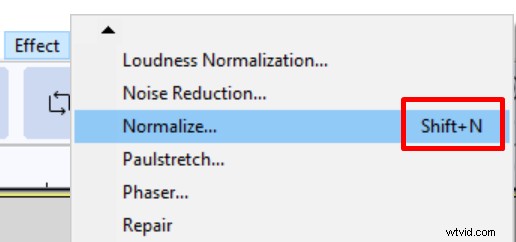
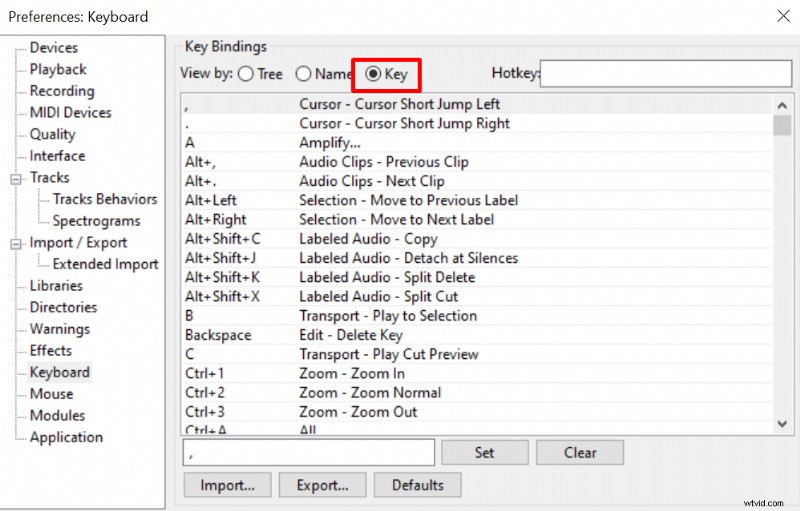
After binding a keyboard key to a particular effect, you’ll find it next to it in the Effect menu. You can also check what sort of keys are already bound to particular effects if you switch from the Tree to Key section of the Key Bindings menu.
How to Create Custom Keyboard Shortcuts in Audacity: Step-by-Step Guide How to Create Custom Keyboard Shortcuts in Audacity: Step-by-Step Guide
  1. Boost Cinema 4D Workflow: logickeyboard's Backlit Keyboard with Essential Shortcuts

  2. How to Eliminate Background Noise in Audacity: Step-by-Step Guide

  3. How to Remove Vocals from Songs in Audacity: Step-by-Step Guide

  4. How to Remove Echo in Audacity: Step-by-Step Guide to Crystal-Clear Audio

  5. How to Reverse Audio in Audacity: Quick Step-by-Step Guide

Adobe Audition
  1. How to Create a Professional Video Storyboard: Step-by-Step Guide

  2. Step-by-Step Guide: How to Create an Effective Marketing Plan

  3. How to Clean Up Noisy Audio in Audacity: Remove Clicks, Plosives & Background Noise

  4. How to Accurately Measure Noise Floor in Audacity: Step-by-Step Guide

  5. How to Deepen Your Voice in Audacity: Step-by-Step EQ and Pitch Guide

  6. How to Master Reverb in Audacity: Step-by-Step Guide

  7. Convert Mono to Stereo in Audacity: Easy Step-by-Step Guide

  8. How to Add Echo Effects in Audacity: Step-by-Step Guide