
Audacity has a great tool to remove vocals from an audio recording. It’s called Vocal Reduction and Isolation. The process of removing vocals is quite complex and removing them cleanly with no remaining artifacts is a challenge, therefore, expect to lose some collateral audio as well.
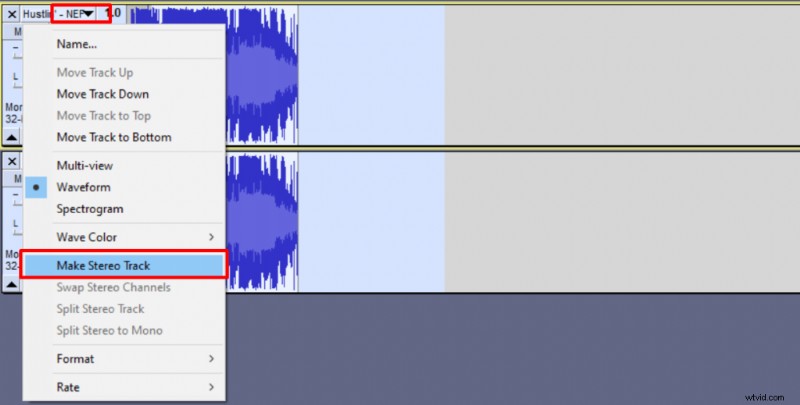
When applying the effect make sure your audio is in stereo. You won’t be able to apply it to a mono track. I’ve included a guide on how to convert mono track to stereo below.
Here’s how you remove vocals in Audacity:
- Select part of your track that you wish vocals to be removed from.
- Go to Effect -> Vocal Reduction and Isolation
- Set your settings like this:
- Strenght – 20%
- Low Cut for Vocals around 100Hz
- High Cut for Vocals around 14000Hz
These settings should remove all vocals. Sometimes you don’t need to remove that many frequencies. Start increasing the Low Cut until you start hearing vocals again and choose the highest appropriate value.
For High Cut frequencies start reducing them until you start hearing vocals again and choose the lowest appropriate value.
If you have a mono recording here’s how to convert it to stereo:
- Select your track and make a duplicated by copying (CTRL+C) and pasting it (CTRL+V)
- Select both tracks
- Click on the first track’s down arrow on the menu
- Click Make Stereo Track
You can learn about removing music from vocals here.