REC

Recommended: Video Production, Editing & Gear Maintenance Guide

 WTVID >> WTVID >  >> Video Editing >> Adobe Audition

How to Split Audio Tracks in Audacity: Step-by-Step Guide

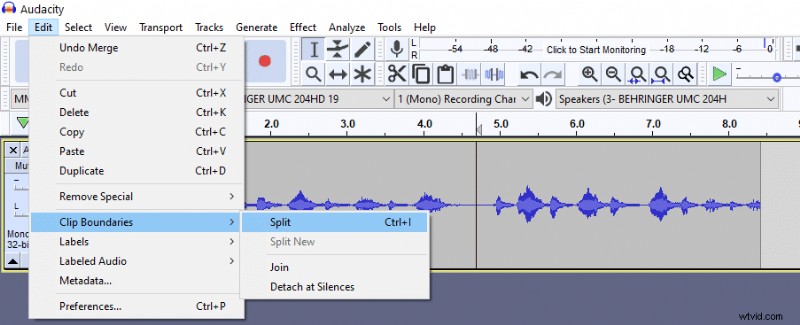
To split audio in Audacity you will have to:

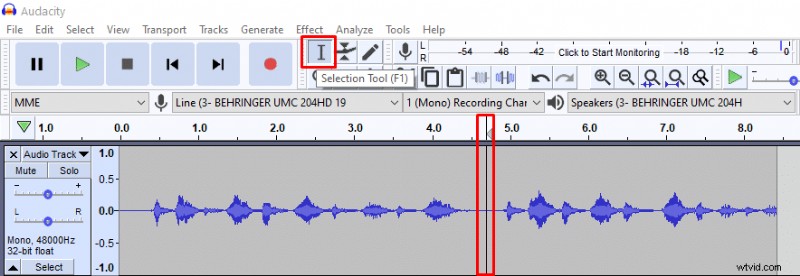
  1. Using Selection Tool mark where you want to split your audio.
  2. Go to Edit>Clip Boundaries>Split OR press Ctrl+I
How to Split Audio Tracks in Audacity: Step-by-Step Guide How to Split Audio Tracks in Audacity: Step-by-Step Guide

How to merge audio after splitting?

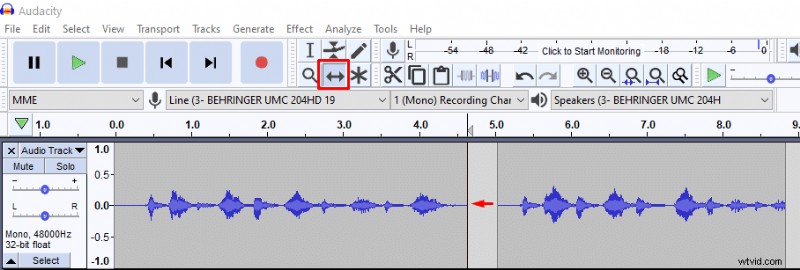
To merge audio tracks after you’ve split them put the tracks together using Time Shift Tool. Then click on the line separating the two tracks to make it dissapear and you’re done.

How to Split Audio Tracks in Audacity: Step-by-Step Guide How to Split Audio Tracks in Audacity: Step-by-Step Guide

How to split audio at silent parts in Audacity?

If you want to split audio into audible parts only, then you have an option to remove silent parts and split an audio track into smaller chunks. It’s very useful when recording your lines for a voice-over project.

Here’s how you can remove silent parts and split audio in Audacity:

  1. After recording go into Multi-view mode (Audio Track>Multi-view). Multi-view will show you where the silent parts are which you can’t see if looking into waveform only.
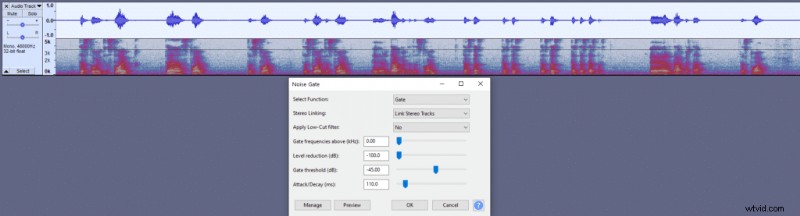
  2. Select your whole recording and apply noise gate effect (Effect>Noise gate). Noise gate is not available by default, you’ll have to install it as a plug-in, you can read how to do that here. Alternatively, you can apply Amplify effect onto parts that you want to make silent, but that’s a longer route.
  3. In noise gate apply a maximum (-100dB) Level reduction and click OK. Now the background noise will be deleted and you’ll have silent parts in your audio.
  4. Go to Edit>Clip Boundaries>Detach at Silences and you’re done.

How to Split Audio Tracks in Audacity: Step-by-Step Guide How to Split Audio Tracks in Audacity: Step-by-Step Guide How to Split Audio Tracks in Audacity: Step-by-Step Guide How to Split Audio Tracks in Audacity: Step-by-Step Guide How to Split Audio Tracks in Audacity: Step-by-Step Guide
  1. How to Record and Edit Audio with Audacity on Mac: Step-by-Step Guide

  2. How to Record Two XLR Microphones in Audacity: Stereo Mode Guide

  3. Boost Audio Volume in Audacity Without Clipping: Proven Step-by-Step Guide

  4. How to Split Audio Tracks in Adobe Premiere Pro: Razor Tool Guide

  5. How to Record High-Quality System Audio with Audacity: Step-by-Step Guide

Adobe Audition
  1. How to Split MP4 Files Easily with Wondershare Filmora

  2. Master Audio Editing in Avidemux: Step-by-Step Guide to Cut, Copy & More

  3. How to Easily Add Photos to Audio with Wondershare Filmora: Step-by-Step Guide

  4. How to Add Audio to Video Easily with Wondershare Filmora

  5. Replace Audio in Videos Online: Easy, Lossless Tool for Any Device

  6. Convert Audio to Video Online: Fast, Free & Easy Guide

  7. How to Install Plugins in Audacity: Complete Step-by-Step Guide

  8. Step-by-Step Guide: How to Split and Merge Audio Clips in Adobe Audition