REC

Recommended: Video Production, Editing & Gear Maintenance Guide

 WTVID >> WTVID >  >> Video Editing >> Adobe Audition

How to Record Two XLR Microphones in Audacity: Stereo Mode Guide

You can record in Audacity with 2 XLR microphones and an audio interface with 2 input lines using stereo recording mode. This method allows to record with 2 XLR mics without having access to a multitrack editor.

However, you will need to own an audio interface to record with two XLR microphones in Audacity.

Here’s how you record with 2 XLR microphones in Audacity:

  1. Plug in 2 XLR microphones into an audio interface via XLR cables
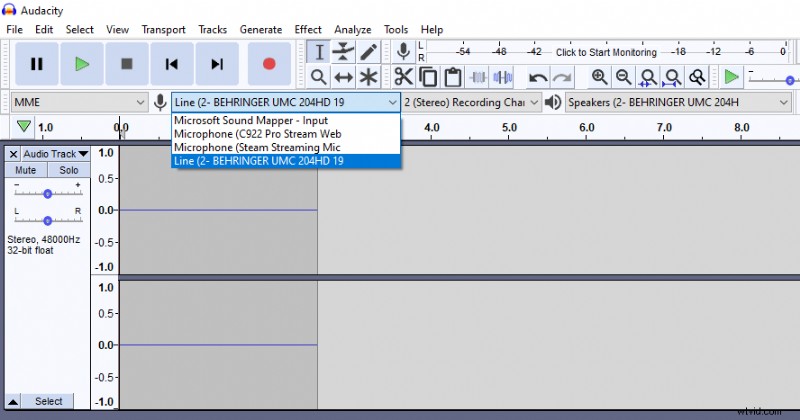
  2. Select your audio interface as your recording device in Audacity
  3. Choose stereo recording mode
  4. Press record
How to Record Two XLR Microphones in Audacity: Stereo Mode Guide
  1. How to Screen Record on Mac with Audio: Step-by-Step Guide

  2. Expert Guide: Record Professional Audio on Your Smartphone or Tablet

  3. How to Split Audio Tracks in Audacity: Step-by-Step Guide

  4. How to Reverse Audio in Audacity: Quick Step-by-Step Guide

  5. How to Easily Record Discord Audio with OBS Studio: Step-by-Step Guide

Adobe Audition
  1. How to Screen Record on Windows 10 with Audio: Easy Step-by-Step Guide

  2. How to Screen Record on Mac with Internal Audio: Best Tools & Guide

  3. How to Record PowerPoint with Audio: Step-by-Step Guide for Windows & Mac

  4. Ultimate Guide: How to Record a Podcast with Multiple Microphones

  5. How to Remove Echo in Audacity: Step-by-Step Guide to Crystal-Clear Audio

  6. How to Clean Up Noisy Audio in Audacity: Remove Clicks, Plosives & Background Noise

  7. How to Record Audio in Reaper DAW: Simple 4-Step Guide for Beginners

  8. How to Master Reverb in Audacity: Step-by-Step Guide