
REC

Recommended: Video Production, Editing & Gear Maintenance Guide

 WTVID >> WTVID >  >> Video Editing >> Adobe Audition

Step-by-Step Guide: How to Split and Merge Audio Clips in Adobe Audition

How to split clips?

To split audio in Adobe Audition:

  1. Work in a Multitrack editor
  2. In the timeline select where you want to split
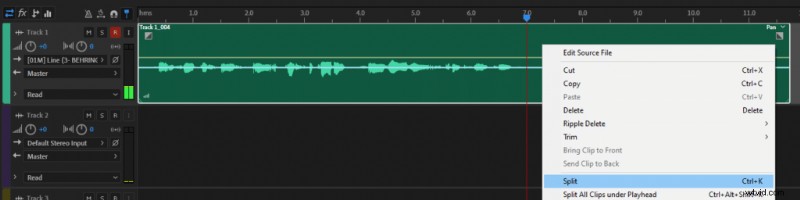
  3. Select the track that you want to split and press Ctrl+K. Alternatively, click the right mouse button onto the track you want to split and in the menu click Split.

If you want to split all the tracks at the selected time then choose the “Split All Clips under Playhead” option or press Ctrl+Alt+Shift+K.

Step-by-Step Guide: How to Split and Merge Audio Clips in Adobe Audition Step-by-Step Guide: How to Split and Merge Audio Clips in Adobe Audition

If you want to learn how to record and edit audio in Adobe Multitrack editor read this article.

How to merge clips?

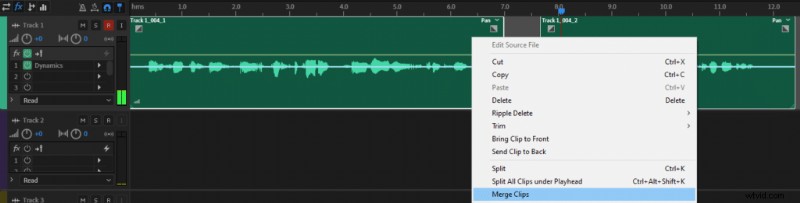
If you want to merge clips select both audio clips, press the right mouse button onto the track and click Merge Clips. Keep in mind that if there are any gaps between the clips they will be converted into quiet audio. If you want to avoid that then join the clips together, by moving them one next to another.

Step-by-Step Guide: How to Split and Merge Audio Clips in Adobe Audition Step-by-Step Guide: How to Split and Merge Audio Clips in Adobe Audition
  1. Eliminate Audio Noise Like a Pro: Adobe Audition & Premiere Pro Tutorial

  2. How to Eliminate Background Noise in Adobe Audition: Step-by-Step Guide

  3. How to Record Audio in Adobe Audition Multitrack: Step-by-Step Guide

  4. Step-by-Step Guide: How to Split and Merge Audio Clips in Adobe Audition

  5. How to Split Audio Tracks in Audacity: Step-by-Step Guide

Adobe Audition
  1. How to Merge and Combine Clips in Adobe Premiere Pro: Step-by-Step Guide

  2. Master Fade In & Fade Out: Audio Editing Tutorial in Adobe After Effects

  3. Expert Guide: How to Perfectly Sync Audio and Video in Adobe Premiere

  4. How to Effortlessly Remove Mouth Clicks in Adobe Audition Using Automatic Click Remover

  5. Effortlessly Remove Breaths from Audio in Adobe Audition: Step-by-Step Guide

  6. How to Use Noise Gate in Adobe Audition: Step-by-Step Guide

  7. How to Accurately Measure Noise Floor in Adobe Audition: Step-by-Step Guide

  8. How to Convert Mono to Stereo in Adobe Audition: Step-by-Step Guide