REC

Recommended: Video Production, Editing & Gear Maintenance Guide

 WTVID >> WTVID >  >> Video Editing >> Adobe Audition

How to Remove Reverb in Adobe Audition: Step-by-Step DeReverb Guide

Adobe Audition has a built-in effect tool called DeReverb which enables you to reduce reverb (echo) from your audio recording.

Here’s how you remove excessive reverb from your audio recording in Audition:

  1. Select audio
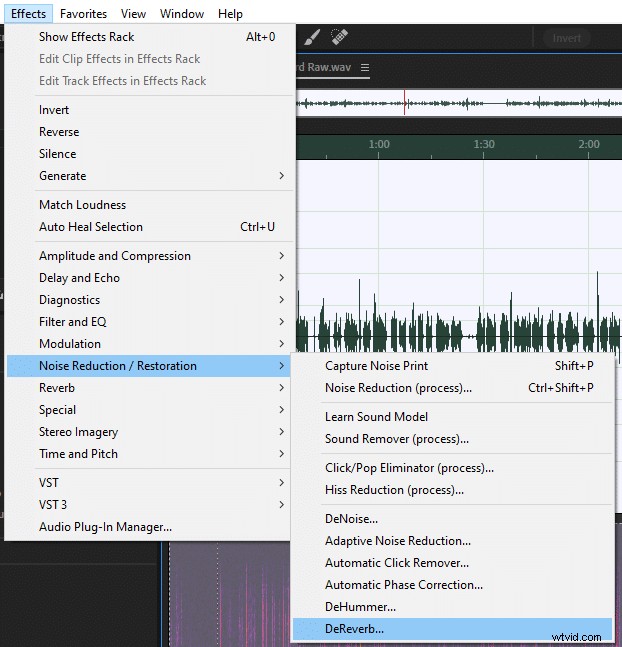
  2. Go to Effect > Noise Reduction / Restoration > DeReverb
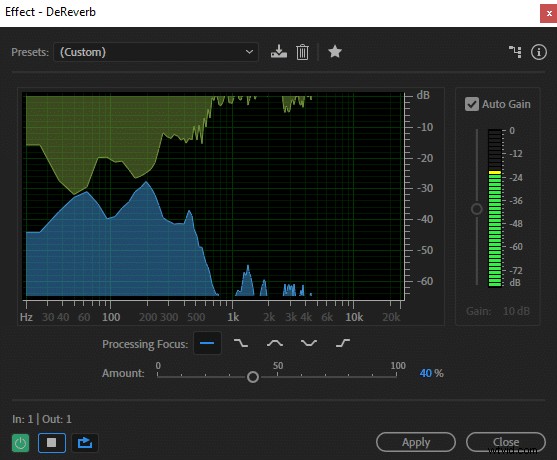
  3. Adjust ‘Amount’ parameter to your liking. 30-40% is optimal.
  4. Click ‘Apply’.
How to Remove Reverb in Adobe Audition: Step-by-Step DeReverb Guide How to Remove Reverb in Adobe Audition: Step-by-Step DeReverb Guide

Don’t set ‘Amount’ parameter too high as that will reduce audio quality. I found that going above 50% made my recordings sound significantly worse. 30-40% seems to be the sweet spot whereas your audio quality is still intact, however, reverb (echo) is significantly reduced.

If you keep ‘Auto Gain’ box checked Audition will maintain audio volume at the same level. Otherwise, your volume will be reduced.

You can read more about preventing reverb and choosing the best recording environment in this article.


  1. How to Remove Echo in Audacity: Step-by-Step Guide to Crystal-Clear Audio

  2. Expert Guide: How to Effectively Remove Background Noise from Audio Recordings

  3. How to Record Audio in Adobe Audition Multitrack: Step-by-Step Guide

  4. Step-by-Step Guide: How to Split and Merge Audio Clips in Adobe Audition

  5. How to Master Reverb in Audacity: Step-by-Step Guide

Adobe Audition
  1. Master Adobe Audition: The Ultimate Beginner's Guide to Pro Audio Editing

  2. Quick & Easy Audio Cleanup: Remove Noise Fast in Adobe Audition CC

  3. How to Eliminate Muddy Audio: Step-by-Step EQ Guide for Crystal-Clear Sound

  4. How to Effortlessly Remove Audio Clicks in Adobe Premiere Pro: Step-by-Step Guide

  5. How to Use Noise Gate in Adobe Audition: Step-by-Step Guide

  6. How to Accurately Measure Noise Floor in Adobe Audition: Step-by-Step Guide

  7. How to Convert Mono to Stereo in Adobe Audition: Step-by-Step Guide

  8. Effortlessly Remove Breaths from Audio in Adobe Premiere Pro: Expert Guide