
REC

Recommended: Video Production, Editing & Gear Maintenance Guide

 WTVID >> WTVID >  >> Video Editing >> Adobe Audition

How to Eliminate Muddy Audio: Step-by-Step EQ Guide for Crystal-Clear Sound

Demudding is a process during which using an equalizer we remove frequencies that tend to muddy audio recording making it sound unclear. Attenuating these frequencies helps to add clarity to an audio recording. Most of the time, muddiness lays around 350Hz frequencies, a gentle 3dB cut in this range should remove muddiness from your audio.

Here’s a step by step guide on how to remove muddiness from audio:

  1. Using any audio editing software (DAW) select your audio
  2. Open equalizer effect
  3. Cut 3dB from frequencies around 350Hz range
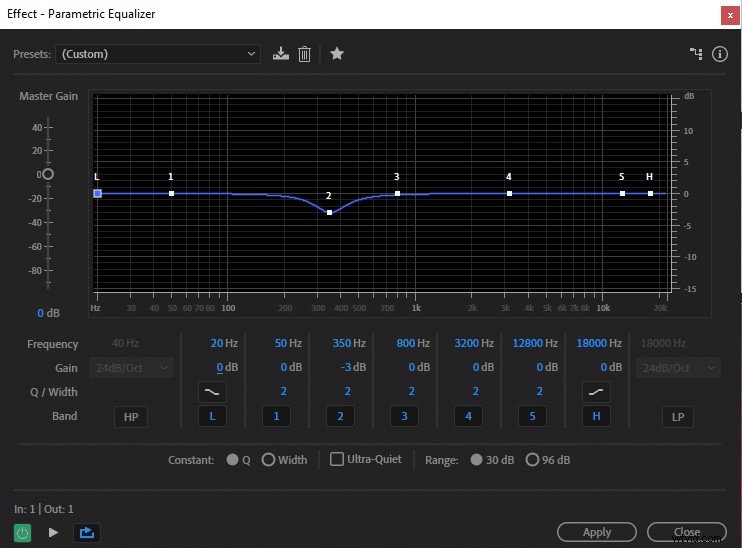
How to Eliminate Muddy Audio: Step-by-Step EQ Guide for Crystal-Clear Sound

Everyone’s voice is different therefore, 350Hz might not be the exact frequencies you want to cut, but in general, that’s where the muddiness is prevalent. You can also play around by cutting different frequencies to see what works the best for you.

If your audio still doesn’t sound clear you can try increasing clarity by doing a wide boost in 2kHz-6kHz frequencies.

When boosting or cutting keep it up to 4dB. If you cut or boost by more than 4dB chances are your audio will start to sound unnaturally weird. For the best results cut/boost the least amount possible that makes your audio sound good. You should be subtle with EQ.

You can also read about improving audio quality here and preventing breaths here.


  1. How to Remove Noise from Video Audio: Pro Step-by-Step Guide

  2. Expert Guide: How to Remove Background Noise from Audio in Premiere Pro

  3. How to Remove Audio from Video: Best Online & Offline Methods

  4. How to Easily Remove Audio from iPhone Videos: Quick Guide

  5. How to Remove Echo in Audacity: Step-by-Step Guide to Crystal-Clear Audio

Adobe Audition
  1. How to Easily Remove Audio from Videos in Magix Movie Edit Pro: Step-by-Step Guide

  2. How to Easily Remove Audio from MOV Files on Windows & Mac with Filmora

  3. How to Mute Audio in Videos: Easy Step-by-Step Guide

  4. How to Remove Audio from Video in Adobe Premiere Pro: Step-by-Step Guide

  5. How to Isolate Vocals: Remove Music Background in Audacity (Step-by-Step Guide)

  6. How to Remove Reverb in Adobe Audition: Step-by-Step DeReverb Guide

  7. How to Effortlessly Remove Audio Clicks in Adobe Premiere Pro: Step-by-Step Guide

  8. Effortlessly Remove Breaths from Audio in Adobe Premiere Pro: Expert Guide