
You can remove music from audio recording using Audacity’s ‘Vocal Reduction and Isolation’ tool. It’s a very capable effect that will remove most of the music from the recording. You might have some music artifacts left, which you can then later further remove with a noise reduction tool if required.
Here’s how to remove music from audio recording with Audacity’s Vocal Reduction and Isolation tool:
- Select the part of audio from which you want music to be removed
- Go to Effect -> Vocal Reduction and Isolation
- Set Action to Isolate Vocals
- Set Low Cut for Vocals at 120Hz and High Cut for Vocals at 10000Hz.
- Click ok
- Go to Effect -> Normalize
- Normalize peak amplitude to -1dB
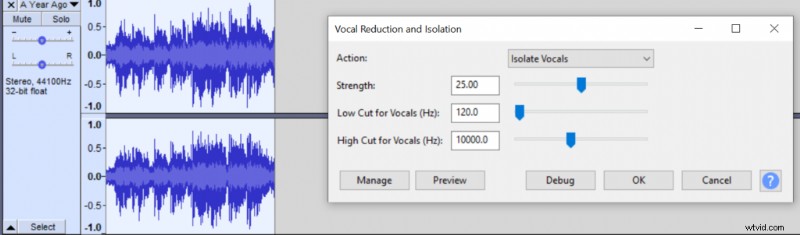
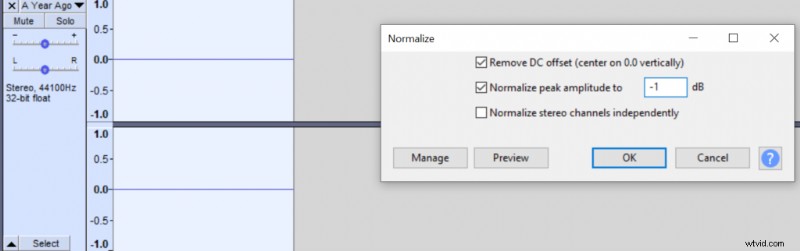
Applying the Isolation effect will maintain Vocal frequencies at the range of 120Hz to 10,000Hz and remove most of the music. Your recording will become very quiet, therefore, we’re using Normalize effect to bring the volume back up. You can try raising the Low Cut for Vocals and lowering High Cut for Vocals to remove even more music but that will come at the cost of removing more vocals, so use it sparingly.
Alone this tool is not sufficient to completely remove the music but if you played it at lower volumes the music shouldn’t be heard.
After applying the isolation effect you can select the parts where previously only the music was played and use the Noise reduction (Effect->Noise reduction) tool to get Noise Profile and then select the whole recording, go to Effect->Noise Reduction again and apply it to further remove the music from the whole audio recording. Doing this will give better isolation but that comes at the cost of lower audio quality.
Audio before removing music in Audacity:
Audio after removing music in Audacity:
Audio after removing music in Audacity with both Isolation and Noise reduction tools:
You can read about removing vocals from music here.