
REC

Recommended: Video Production, Editing & Gear Maintenance Guide

 WTVID >> WTVID >  >> Video Editing >> Adobe Audition

How to Accurately Measure Noise Floor in Audacity: Step-by-Step Guide

You can measure noise floor (room tone) in Audacity by recording your environment without extrinsic noises. When recording noise floor make sure there are no unusual background noises and keep your audio recording levels at the usual settings.

Here’s how you measure your noise floor in Audacity step by step:

  1. Record in a quiet room for ~5s
  2. Play the recording back
  3. Observe playback level
  4. The highest point on the playback level is your noise floor
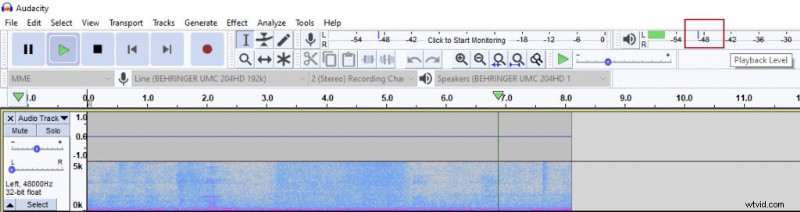
How to Accurately Measure Noise Floor in Audacity: Step-by-Step Guide

I am using Audacity in this example, but any DAW will be able to measure your noise floor and the same principles apply.

Knowing your noise floor will be important when applying such effects as noise gate or noise reduction.


  1. Easy Noise Reduction in Audacity & FilmoraPro: Step-by-Step Guide

  2. Step-by-Step Guide: Install and Use Noise Gate Plugin in Audacity

  3. How to Install Plugins in Audacity: Complete Step-by-Step Guide

  4. How to Split Audio Tracks in Audacity: Step-by-Step Guide

  5. How to Reverse Audio in Audacity: Quick Step-by-Step Guide

Adobe Audition
  1. How to Create Custom Keyboard Shortcuts in Audacity: Step-by-Step Guide

  2. How to Remove Vocals from Songs in Audacity: Step-by-Step Guide

  3. How to Remove Echo in Audacity: Step-by-Step Guide to Crystal-Clear Audio

  4. How to Deepen Your Voice in Audacity: Step-by-Step EQ and Pitch Guide

  5. How to Master Reverb in Audacity: Step-by-Step Guide

  6. Convert Mono to Stereo in Audacity: Easy Step-by-Step Guide

  7. How to Add Echo Effects in Audacity: Step-by-Step Guide

  8. How to Clean Audio for Professional Videos: Expert Tips & Microphone Guide