
REC

Recommended: Video Production, Editing & Gear Maintenance Guide

 WTVID >> WTVID >  >> Video Editing >> Adobe Audition

How to Create a Demonic Voice Effect in Audacity: Step-by-Step Guide

A demonic voice can be created in Audacity by using three effect tools: Change Pitch, Bass and Treble, and Reverb.

You can create a demonic voice by following these steps in Audacity:

  1. Copy your track
  2. Apply Change pitch effect on both tracks (Effect->Change Pitch)
  3. Lower pitch by 10-20 semitones
  4. Apply Bass and Treble effect on both tracks (Effect->Bass and Treble)
  5. Boost Bass by 6dB
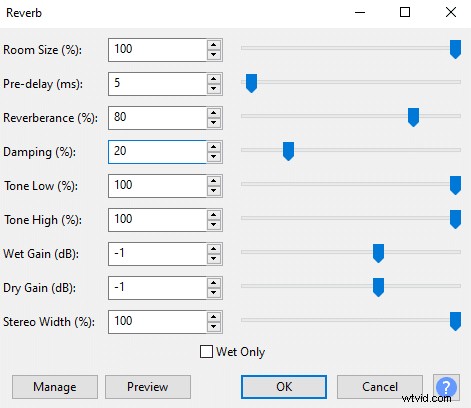
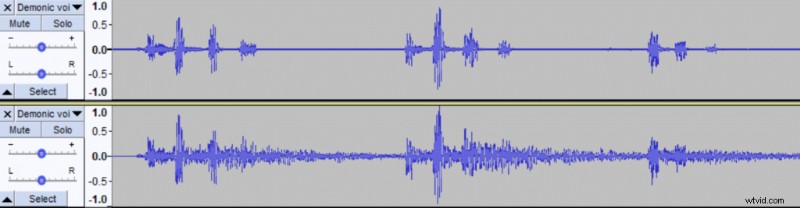
  6. Apply Reverb effect to the second track only
  7. Set Room size to 100%, Pre-Delay to 5ms, Reverberance to 80%, Damping to 20%.
How to Create a Demonic Voice Effect in Audacity: Step-by-Step Guide

You can play around with the settings, especially in the Change pitch effect. In this example, I’ve set it to -16 semitones but it depends on how deep your voice is already and the end result you want to achieve. The lower the pitch the more demonic and the less realistic it’ll sound.

If possible try lowering your voice and adding some gravel when recording, then you won’t need to rely on Change pitch and Bass and Treble effects as much.

The voice will sound demonic with Change pitch effect alone, however, adding some bass gives more depth to it while reverb adds more drama and inhumanity to it. Still, there are a few ways to go about it, so don’t be afraid to experiment with the effects and settings.
How to Create a Demonic Voice Effect in Audacity: Step-by-Step Guide
  1. How to Create Realistic Water Light Reflection Effects: Step-by-Step Guide

  2. How to Make Your Voice Sound Professional in Audacity: 3 Easy Steps

  3. How to Create Professional Video Fade Effects Online – Easy Guide

  4. How to Raise Your Voice Pitch in Audacity: Step-by-Step EQ and Change Pitch Guide

  5. Create Robotic Voice Effects in Audacity: Easy Step-by-Step Guide

Adobe Audition
  1. Master the Dreamy Orton Effect in Photoshop: Step-by-Step Guide

  2. Create Stunning Glitch Effects in Photoshop: Easy Step-by-Step Guide

  3. How to Create a Stunning Starburst Effect in Your Photos

  4. Create Stunning Glitch Effects in Photoshop: Step-by-Step Tutorial

  5. How to Create Stunning Pixel Art in Adobe After Effects: Step-by-Step Guide

  6. Master the Video Wall Effect in Filmora: Step-by-Step Tutorial

  7. How to Create Stunning Mirror Effects in Videos: Step-by-Step Guide

  8. Create Realistic Clouds in After Effects: Pro Tutorial to Fix Overexposed Skies