
You can make your voice higher by using Audacity’s Graphic EQ and Change Pitch tools. You’ll be boosting higher frequencies with EQ and raising the pitch of your voice with a pitch changer. Still, for the best results, it’s best to record your voice higher using natural techniques.
Make your voice higher with EQ
Here’s how to boost higher frequencies using EQ in Audacity:
- Select your whole audio recording
- Go to Effect->Graphic EQ
- Remove everything below 60Hz
- Cut 60Hz-250Hz by -4dB
- Boost 3kHz and above by 4dB
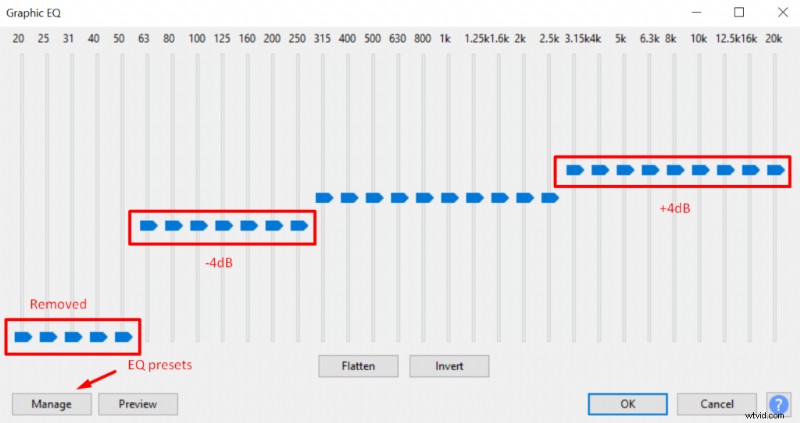
It’s not only just boosting higher frequencies but you’re also going to cut lower frequencies to enhance the higher-end. Also, don’t boost/cut by more than 5dB unless it’s frequencies that don’t belong to human voice such as below 60Hz.
You can play around with the settings in Graphic EQ and there’re some useful presets made by Audacity, you can try them out. Still using EQ the change of the voice should be quite subtle compared to what we’re going to do with the Change Pitch effect.
Make your voice higher with pitch changer
To make your voice higher with the Change Pitch effect in Audacity you’ll be following these steps:
- Select your whole audio recording
- Go to Effect->Change Pitch
- Add up to 4 semitones to your voice (2 is optimal for me)
Using the Change Pitch effect your voice will change the voice drastically, I recommend sticking with more subtle changes if you wish to maintain a somewhat realistic human voice, otherwise you might sound ridiculous. If you don’t mind an absurdly high-pitched voice and that’s what you aim for, then going above 4 semitones might suit you.
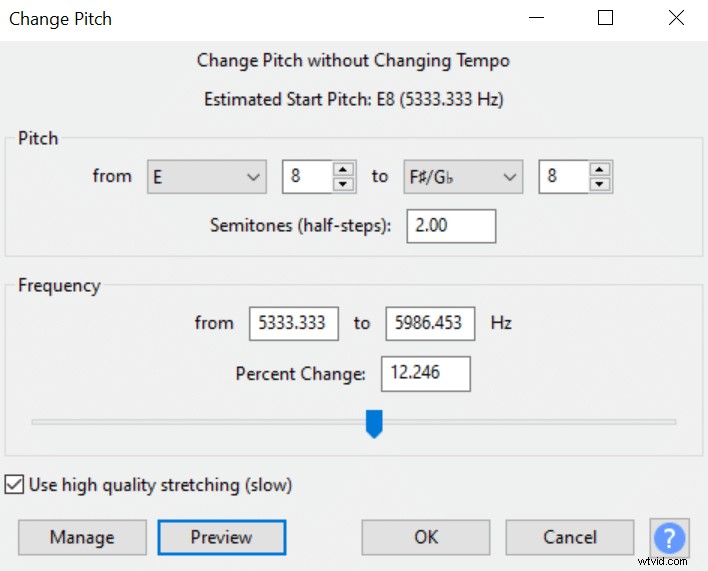
These tips alone will help to make your voice significantly higher but if you want to get the best results I recommend recording your voice naturally higher by applying vocal techniques and then further tuning it with audio effects.