
To make a demonic voice you’ll need to lower the pitch and add a lot of reverb. You can make a demonic voice in Premiere Pro by using Pitch Shifter and Studio Reverb effects.
Here’s how to apply Pitch Shifter audio effect:
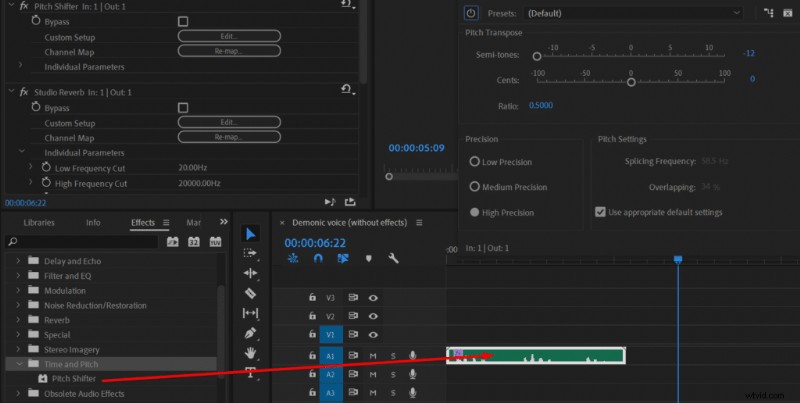
- Go to Effects->Audio Effects->Time and Pitch->Pitch Shifter
- Drag the Pitch Shifter effect onto your audio clip
- Click edit in the Effect Controls menu
- Reduce pitch by 12 semi-tones
- Again drag the effect onto your clip
- Again click edit in the Effect Controls menu
- Reduce pitch by another 4 semi-tones
Premiere Pro only allows to reduce pitch by 12 semi-tones, that’s why we’re applying the Pitch Shifter effect twice and reducing the pitch by another 4 semi-tones.
Changing pitch will make the voice sound inhumanly low and completely unnatural which is what we’re striving for when creating a demonic voice. You can play around by lowering the pitch less or even more, the perfect amount depends on your preference and the natural pitch of the recording.
After applying Pitch Shifter effect twice you’ll want to add some reverb using a Studio Reverb effect:
- Go to Effects->Audio Effects->Reverb->Studio Reverb
- Drag Studio Reverb effect onto your clip
- Click edit in the Effect Controls menu
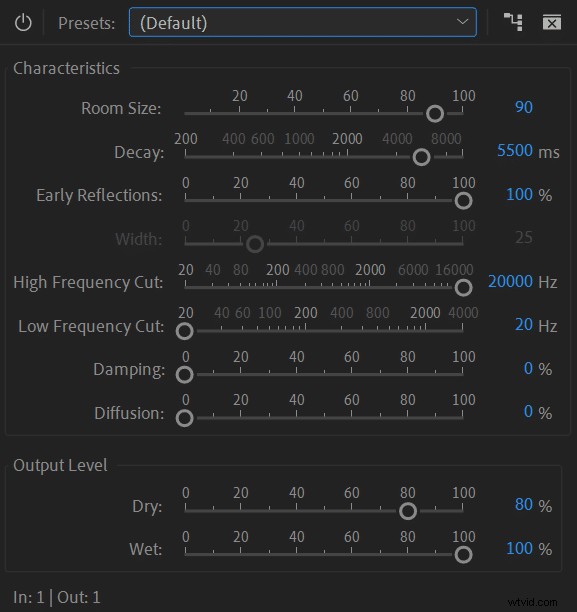
- Set Room Size to 90, Decay to 5500ms, Early Reflections to 100%, High Frequency Cut to 20000Hz, Low Frequency Cut to 20Hz, Damping to 0%, Diffusion to 0%, Dry Output Level to 80%, Wet Output Level to 100%.
Using reverb we are adding even more inhuman voice qualities. You can play around with the effect and change Room Size, Decay and Dry/Wet settings. I would only strongly recommend keeping Low Frequency Cut at 20Hz as we reduced the pitch to very low frequencies and cutting lower frequencies would cancel Pitch Shifter effect.
Here’s original audio without any effects applied:
Audio after applying effects in Premiere Pro to make it sound demonic:
It would also help if you attempted to make your voice deeper and grittier during recording, then you wouldn’t need to rely on using effects as much and could maintain better audio quality. For tips on how to get a deeper voice read this article.