To create an underwater sound effect you will have to make your audio sound muffled by removing high-end frequencies. Also, if you want to have a transition from above the water to under the water audio, you will have to silence the audio a bit when the transition happens.
Adding some water sound effects also will add some more depth to the ‘underwater’ sound effect.
Cut high-end frequencies using EQ
First of all, to achieve the muffled underwater sound effect you will want to cut high and even some of the mid audio frequencies.
Try cutting frequencies above 1kHz to make your audio sound as if it is deep under the water. It will muffle it and reduce the intelligibility of the audio by quite a lot.
Here’s before and after for a comparison:
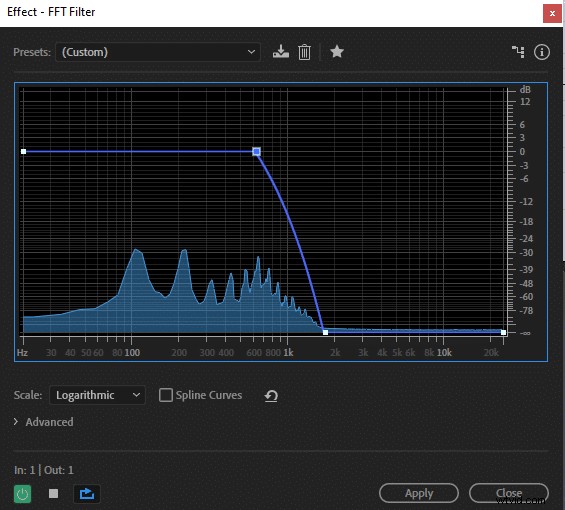
You can adjust EQ to your liking, if you keep more of the mid to high frequencies the underwater effect will be more subtle and vice versa, cutting even more of the higher frequencies will make your audio hardly intelligible.
You can also add water sounds to make the effect more expressed as it will sound like your muffled voice comes from under the moving water.
In this example, I’ve used a free ‘Water Lapping Wind’ sound effect from Youtube library and applied the same EQ effect I’ve used on the voice.
How to make the transition from normal to underwater audio?
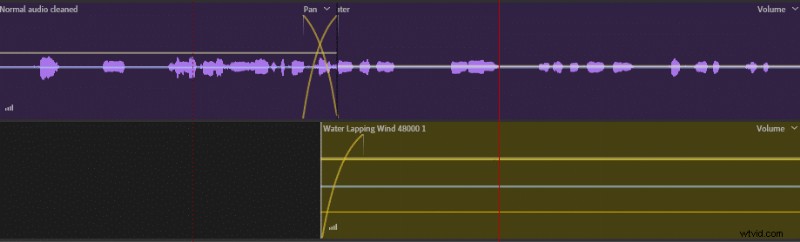
To create a transition effect from normal to underwater audio try combining two tracks and using a transition tool. Reducing the ‘underwater’ audio track’s volume by 3-5dB will also help to achieve a more convincing transition effect.
Here’s how it looks on my multitrack editor: