
REC

Recommended: Video Production, Editing & Gear Maintenance Guide

 WTVID >> WTVID >  >> Video Editing >> Adobe Audition

How to Make Voice Recordings Sound Like a Real Phone Call: EQ Guide

How to Make Voice Recordings Sound Like a Real Phone Call: EQ Guide

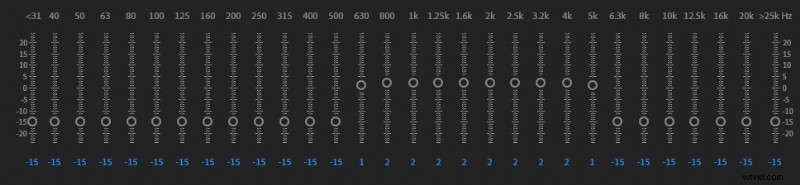
To make audio recording sound like a phone call you will need to use an equalizer. You will have to set your EQ settings to the following:

  • Reduce frequencies at 500Hz and below by 15dB
  • Reduce frequencies at 6,000Hz and above by 15dB
  • Boost frequencies from 600Hz to 5,000Hz by 2dB

You may cut more at 0Hz-500Hz and 6,000Hz-20,000Hz and boost at 600Hz-5,000Hz if you want a more significant phone call effect.

Also, some DAWs may offer EQ presets designed to make your voice sound like on a phone, you might as well try using it.

This method is designed to replicate how phone calls sound.

500Hz-5,000Hz frequency range gives the most presence to your voice. Phone devices focus on this range to give your voice clarity which creates a specific phone call sound that is clear, but at the same time a bit harsh and tiny.

Use your phone

A second method to create phone call audio is by actually using a phone. Calling your phone and recording the conversation into the microphone will give an authentic phone call voice impression.


  1. DIY Horror Sound Effects: Create Spooky Sounds with Everyday Items for Halloween

  2. How to Make Secure Video & Voice Calls on Signal for iPhone: Step-by-Step Guide

  3. Expert Guide: How to Use EQ Equalizer for Superior Audio Quality

  4. How to Deepen Your Voice in Audacity: Step-by-Step EQ and Pitch Guide

  5. How to Develop a Deeper, More Masculine Voice: Proven Training Techniques

Adobe Audition
  1. Elevate Your Podcast Audio: Ultimate Guide to the Best Recording Setup

  2. How to Set a TikTok Sound as Your Ringtone or Alarm on Android & iPhone

  3. How to Easily Decline Incoming Calls on iPhone: Quick Guide

  4. How to Intentionally Distort Microphone Audio: DAW Effects and Simple Techniques

  5. How to Create Realistic Underwater Sound Effects: Pro EQ Techniques

  6. How to Raise Your Voice Pitch in Audacity: Step-by-Step EQ and Change Pitch Guide

  7. Create Robotic Voice Effects in Audacity: Easy Step-by-Step Guide

  8. Create a Professional Robotic Voice Effect in Adobe Audition: Step-by-Step Guide